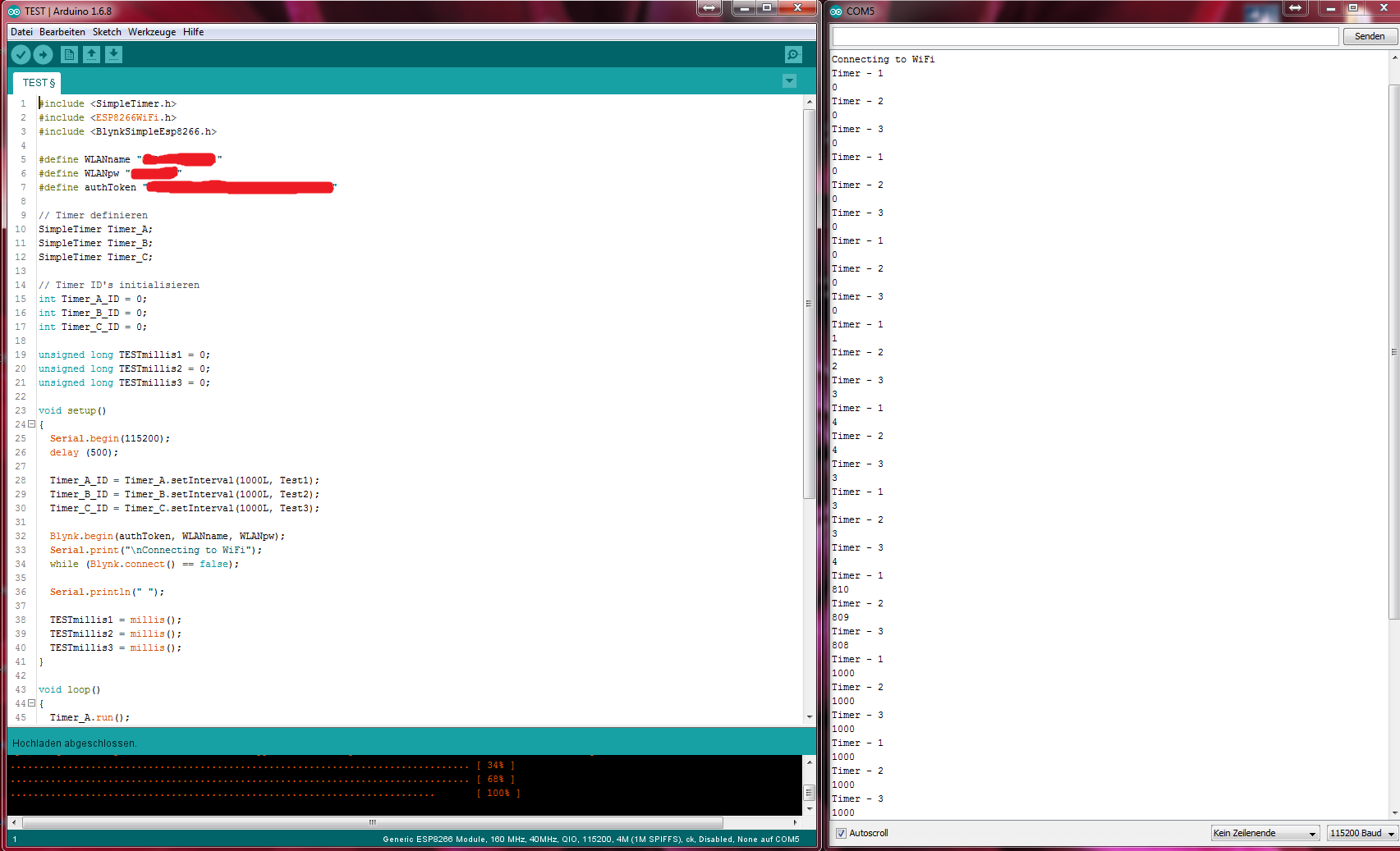
My timers worked fine as they were in subroutines that are called sometime.
But then I started using them in the main routine and noticed they won’t work in the beginning just after Blynk does connect (see Picture, I measured the millis - Blynk App was closed while testing - mobile phone on standby/screen off).
So I wrote a simple Sketch to test it. Thats also where the picture came from.
(I removed Blynk.run() from the sketch to make it as simple as possible. Got the same result with blynk.run)
As soon as I comment out the connect part the timer is working correctly for me:
Maybe but it should work anyway with Blynk so this shoud be looked into
Maybe I’m thinking the wrong way but I need Timers that will be used in main as well as many subroutines. Therefore It won’t work for me with ONE Timer instance.
I need:
a timer to blink my Error LED that needs to be independend and able to be enabled and disabled
a timer to blink my Warn LED that needs to be independend and able to be enabled and disabled
a timer for checking sensors that can run all time
a timer for checking sensors quickly that can run all time
a timer for pushing data to Blynk at normal rate that can run all time
a timer for pushing data to Blynk quickly in a special mode
As well as some other that are critical and where I didn’nt decide by now if I will use Timer Lib or the internal Microprocessor Timer.
I would at least need 2 timer instances. One for normal and one for the special mode.
Also the Warn/Error timers won’t be used only in for example the error routine so It would be neccessary to enable and disable them. Sure I could write “around that issue” and for example embedd them in IF statements and check another variable set for this but that would mean many unneccessary program code that would mess up the routines and complicate the program unneccissarily.
Why should I not set up timers to enable and disable them (which is the more clean and easy way) when the Lib is made for that.
Could please any Blynk official look into that issue and check why this is behaving that way?
Yr welcome. It’s always good to keep a couple eyes out and open and let someone else look at it. I use the timers and subroutines to do exactly what you want, stop and start timers based on different events.
For example, in the daytime I check for the light level every 10s and when I detect it becomes to dark, I reset the interval to 5 minutes because I don’t want my automatic lights to go on and off every 10s seconds
But if I loose connection for some reason and it gets messed up again at the next reconnect (will test right now) I can’t ensure that Blynk doesn’t get flooded when using timers.
Think you will find it is WiFi that messes up timers and lots of other things, NOT Blynk.
I’m not that experienced to look into all those Libs to check which one causes the problem.
Will try with WiFi.begin to see if that happens there as well.
Why? I got a timer that pushes in 1 second intervall.
Once it connects the interval is set to 0-3ms so it sends some times very quickly as in the sample sketch. The flood error was the reason I found that problem in the first place.