Something prevents js from loading. Do you have firewall? Do you use adblock?
No mate to my knowledge I’ve no special blocking or firewall rules.
As workaround you can open it from girhub - https://github.com/blynkkk/blynkkk.github.io just open necessary md file.
Dmitriy, I will post logs when I get to my RPi. Meanwhile, here is my code…see anything here that might cause disconnects or strange behavior? Thanks!
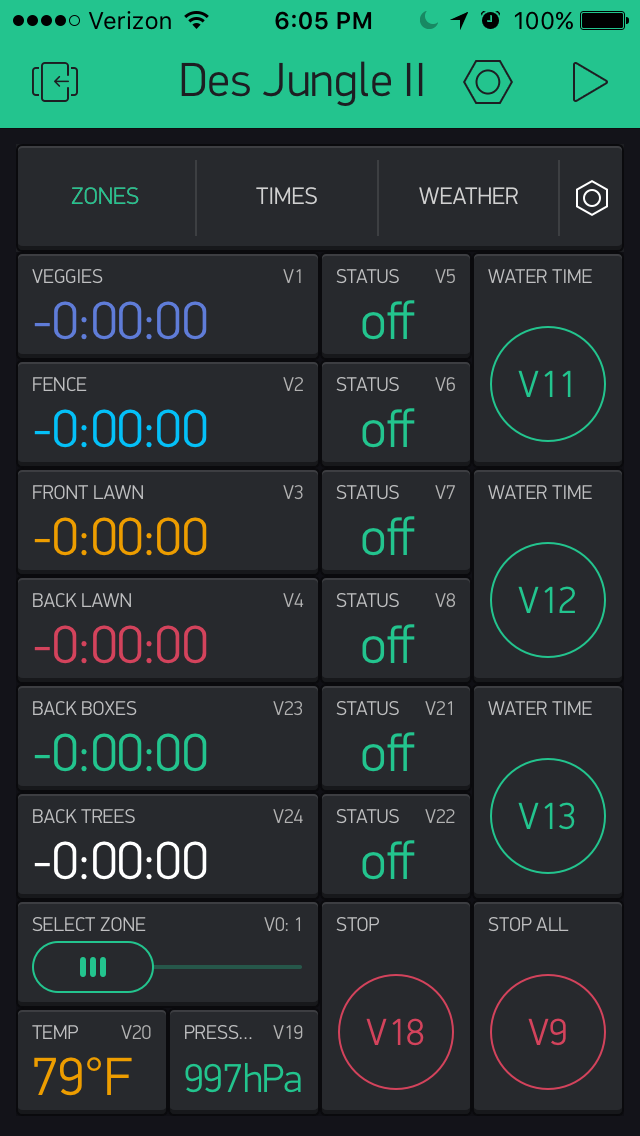
 /**************************************************************
 * Blynk is a platform with iOS and Android apps to control
 * Arduino, Raspberry Pi and the likes over the Internet.
 * You can easily build graphic interfaces for all your
 * projects by simply dragging and dropping widgets.
 *
 *   Downloads, docs, tutorials: http://www.blynk.cc
 *   Blynk community:            http://community.blynk.cc
 *   Social groups:              http://www.fb.com/blynkapp
 *                               http://twitter.com/blynk_app
 * Inspired by code from Alex Tzapulica - " Blynk Sprinkler Relay"
 * Extended by Andrew Clark 4/16 to manage 6 zones and work with Adafruit Huzzah board, relay board
 * Updated 6/16 to include temp, pressure and new app UI
 */
//#define BLYNK_DEBUG
#define BLYNK_PRINT Serial        // Comment this out to disable prints and save space
#define BLYNK_EXPERIMENTAL

#define TIME_SECONDS 1000
#define TIME_MINUTES 60000

#define TIME_UNIT TIME_MINUTES
//#define TIME_UNIT TIME_SECONDS

// Current target HW is Adafruit Feather HUZZAH with ESP8266 WiFi
#include <ESP8266WiFi.h>          //https://github.com/esp8266/Arduino
#include <BlynkSimpleEsp8266.h>   //https://github.com/blynkkk/blynk-library
#include <EEPROM.h>
#include <ESP8266mDNS.h>

#include <WiFiManager.h>          //https://github.com/tzapu/WiFiManager
#include <Wire.h>
#include <SFE_BMP180.h>
#include <SimpleTimer.h>          //http://playground.arduino.cc/Code/SimpleTimer  || https://github.com/jfturcot/SimpleTimer

//either create a config.h and define auth token there
//or comment and include here like:
 //char auth[] = "35ce2fcf4ffa4071bcedb02c87cdf929"; // local server!
 char auth[] = "e76d5c087356438c9b5c9eb89e05339b"; // local RPI3 server!
 //char auth[] = "bf9845a237214a7e81b2fe6e097ff84f"; // Blynk server!

SFE_BMP180 pressure; // instance of SpRKFUN BMP180 temp/baro chip

SimpleTimer timer;
int timerId;
int status;
unsigned long counter = 0;

float h = 0;
float t = 0;
double temperature;
 double pression;
 float press;
float temp;

WidgetLED led1(V31); //register to virtual pin 31

boolean started = false;

int selected = 0;

const int channelPins[6]          = {16, 15, 14, 13, 12, 0};  // pins to actuate relays, set for Adafruit Huzzah
const int channelRemainingPins[6] = {1, 2, 3, 4, 23, 24};
const int channelDataPins[6] =      {40, 41, 42, 43, 44, 45};  // pins for history graph display
const int channelStatusPins[6]    = {5, 6, 7, 8, 21, 22};
unsigned long wateringStart[6]    = {0, 0, 0, 0, 0, 0};
unsigned long wateringLength[6]   = {0, 0, 0, 0, 0, 0};
String statuses[6]                = {"", "", "", "", "", ""};

// timer values for zones (in minutes)
const int time1 = 1;
const int time2 = 2;
const int time3 = 5;
const int time4 = 10;

const int numZones = 6; // support 6 zones

const int CMD_WAIT = 0;
const int CMD_START = 1;
const int CMD_STOP = 2;
const int CMD_STOP_SELECTED = 3;
const int CMD_STOP_EXPIRED = 4;

int state = CMD_WAIT;

void tempPressure()
{
  // get pressure and temperature and display
     status = pressure.startTemperature();
   if (status != 0) {
    delay(status);
    status = pressure.getTemperature(temperature);
    if (status != 0) {
      status = pressure.startPressure(0);
      if (status != 0) {
        delay(status);
        status = pressure.getPressure(pression, temperature);
        if (status != 0) {

      float temperatureF = (9.0/5.0)*temperature+32.0;
      int tempPress = (int)pression;
      int tempTemp = (int)temperatureF;

      String pressy = (String)tempPress;
      String tempy = (String)tempTemp;

      pressy += "hPa";
      tempy += "°F";

    // This command writes temp to display
    Blynk.virtualWrite(20, tempy); // value disp
    //Blynk.virtualWrite(20, tempTemp); // history graph on 2nd tab

    // This command writes barometric pressure to display
    Blynk.virtualWrite(19, pressy); // value disp
    //Blynk.virtualWrite(19, tempPress); // gauge on 2nd tab

        }
      }
    }
  }
} // tempPressure;

// Calculates and updates remaining watering time for each channel
void heartBeat() {
  counter++;

  int i = counter % numZones;
  unsigned long remaining = 0;
  unsigned long elapsed = 0;
  int h,m,s,ms;
  unsigned long over;
  String rem = "";

  // calc watering time and build time remaining string
  if (wateringStart[i] > 0) {
    remaining = (wateringStart[i] + wateringLength[i] - millis()) / TIME_UNIT ;
    elapsed = (wateringStart[i] + wateringLength[i] - millis());  //elapsed=finished-start
   // parse hours / mins / seconds
    h=int(elapsed/3600000);
    over=elapsed%3600000;
    m=int(over/60000);
    over=over%60000;
    s=int(over/1000);
    rem =  String(remaining, DEC); // make mins into string
    if (s < 10) {
      rem = rem + ":0" + s; // add leading zero if < 10
    }
    else {
      rem = rem + ":" + s; // append seconds
    }
  }

  Blynk.virtualWrite(channelRemainingPins[i], rem); // update time remaining in app

  //Blynk.virtualWrite(channelDataPins[i], remaining);  // write to history graph

  if (wateringStart[i] > 0 && wateringStart[i] + wateringLength[i] < millis()) {
    //done watering
    state = CMD_STOP_EXPIRED;
  }

} // Heartbeat

void setStatus(int channel, String s) {
  statuses[channel] = s;
  Blynk.virtualWrite(channelStatusPins[channel], s);
}
void setStatusBoot() {  // show app that the HW is ready

    setStatus(0, "Des'");
    yield();
    setStatus(1, "Jun ");
    yield();
    setStatus(2, "gle ");
    yield();
    setStatus(3, "Has");
    yield();
    setStatus(4, "Boot");
    yield();
    setStatus(5, "ed  ");
    yield;
}
void startWatering(int channel, int wl) {
  wateringLength[channel] = wl * TIME_UNIT;
  setStatus(channel, "  on"); // new
  state = CMD_START;
  Blynk.virtualWrite(channelDataPins[channel+1], wl); // write water time data to History Graph
}

void stopWatering(int channel) {
  digitalWrite(channelPins[channel], HIGH); // reset relay back to OFF
  wateringStart[channel] = 0;
  wateringLength[channel] = 0;
  setStatus(channel, "  off");
  Blynk.virtualWrite(channelRemainingPins[channel], 0);

}
void blinkLedWidget()
{
  if (led1.getValue()) {
    led1.off();
    BLYNK_LOG("LED1: off");
  } else {
    led1.on();
    BLYNK_LOG("LED1: on");
  }
}
  void processCommands() {
// State machine for UI commands
  if (state != CMD_WAIT) {
   // Serial.println("new command");
    switch (state) {

      case CMD_START: // START WATERING

        digitalWrite(channelPins[selected], LOW); // LOW = activate...kick selected relay to LOW
        if (wateringStart[selected] == 0) {
          wateringStart[selected] = millis();
          setStatus(selected, "   ON"); // ??
        }
        break;
      case CMD_STOP: // STOP ALL WATERING
       // Serial.println("stop all");
        for (int i = 0; i < numZones; i++) {
          //done watering
          stopWatering(i);
        }
        break;
      case CMD_STOP_SELECTED: // STOP CHANNEL WATERING
      //  Serial.println("stop selected");
        //done watering
        stopWatering(selected);
        break;
      case CMD_STOP_EXPIRED:  // STOP EXPIRED
      //  Serial.println("stop expired");
        for (int i = 0; i < numZones; i++) {
          if (wateringStart[i] > 0 && wateringStart[i] + wateringLength[i] < millis()) {
            //done watering
            stopWatering(i);
          }
        }
        break;
    }
    //reset state
    state = CMD_WAIT;
  }
   } // processCommands

void setup()
{

  Serial.begin(115200);

  WiFiManager wifi;
 //  wifi.resetSettings();    //Uncomment this to wipe WiFi settings from EEPROM on boot.
  //taking care of wifi connection. Seems convoluted and redundant but seems to work reliably

  wifi.autoConnect("Blynk"); //wifi manager does it s thing then gives control back only when connected

 const char* ssid     = "xxxxx"; //
 const char* pass = "yyyyyyyy";  //

 // select best way to connect to Blynk and pass IP

  //Blynk.begin(auth, ssid.c_str(), pass.c_str()); //pass ssid and psss to blynk to reconnect
  //Blynk.begin(auth, ssid, pass); //pass ssid and psss to blynk cloud
  //Blynk.begin(auth, ssid, pass, IPAddress(10,0,0,8)); //local server
  //Blynk.begin(auth, ssid, pass, IPAddress(192,168,1,109)); //local server
   Blynk.config(auth, IPAddress(10,0,0,8));  // trying this method for local Blynk server
  // Blynk.connect();

  //setup pins
  for (int i = 0; i < 7; i++) {
    pinMode(channelPins[i], OUTPUT);
    digitalWrite(channelPins[i], HIGH); // initialize to HIGH (=off) for relay board
    delay(10);
  }

  //set up timers
  timer.setInterval(1000, heartBeat);
  timer.setInterval(1000, blinkLedWidget);
  timer.setInterval(10000,tempPressure); // get, display temperature and baro pressure
  timer.setInterval(1000, processCommands);  // command state machine

  //setup hardware

  if (pressure.begin())
    Serial.println("Temp & Pressure sensor activated");
  else
    Serial.println("Sensor failed to initialize...check connections");

  Serial.println("done with HW setup");
}

void loop()
{
  //blynk connect and run loop
  Blynk.run();
  timer.run();

  //run ONCE after blynk is connected
  if (!started && Blynk.connected()) {
    started = true;
    setStatusBoot();
  }

} // Void Looop

// Read Selected Zone from slider widget
BLYNK_WRITE(0) {
  //Serial.println("selected"); // slider
  int a = param.asInt();
  selected = a - 1;
}

BLYNK_WRITE(11) {
  int a = param.asInt();
  if (a != 0) {
    startWatering(selected, time1);
  }
}

BLYNK_WRITE(12) {
  int a = param.asInt();
  if (a != 0) {
    startWatering(selected, time2);
  }
}

BLYNK_WRITE(13) {
  int a = param.asInt();
  if (a != 0) {
    startWatering(selected, time3);
  }
}


//status indicator - value display widget
BLYNK_READ(5) {
  Blynk.virtualWrite(5, statuses[0]);
}
BLYNK_READ(6) {
  Blynk.virtualWrite(6, statuses[1]);
}
BLYNK_READ(7) {
  Blynk.virtualWrite(7, statuses[2]);
}
BLYNK_READ(8) {
  Blynk.virtualWrite(8, statuses[3]);
}
BLYNK_READ(21) {
  Blynk.virtualWrite(21, statuses[4]);
}
BLYNK_READ(22) {
  Blynk.virtualWrite(22, statuses[5]);
}

//stop all - button
BLYNK_WRITE(9) {
  int a = param.asInt();
  if (a != 0) {
    state = CMD_STOP;
  }
}

//stop - button
BLYNK_WRITE(18) {
  int a = param.asInt();
  if (a != 0) {
    state = CMD_STOP_SELECTED;
  }
}

// uptime data
BLYNK_READ(30) {
  long uptime = millis() / TIME_UNIT;
  Blynk.virtualWrite(30, uptime);
}

//RESET ESP V31 - Button
BLYNK_WRITE(31) {
  int a = param.asInt();
  if (a != 0) {
    Serial.println("reset");
    ESP.reset();
    delay(1000);
  }
}
1 Like
Hi…a bit more information. If I start clean with a reboot of the server on the RPi the app works well. It appears that the disconnections start when the app is shut off and then re-started. This can happen either through disconnecting the iPhone, or stopping the app and restarting (although if I simply turn the app off and on using the “>” at the top it continues to work!) If I again restart the server (0.18.0) on the RPi everything works as it should. Not sure if this helps but it does appear to be a symptom of some kind of app to server connection issue. As I said in previous post, I am using WiFiManager with Adafruit Huzzah ESP board, and Blynk server on RPi 3. Thanks.