Oh lovely! It is rather disappointing that PLUS plan members are left behind…
Thanks for the assistance and feedback.
Les
Oh lovely! It is rather disappointing that PLUS plan members are left behind…
Thanks for the assistance and feedback.
Les
I would have thought that the default roll would be a USER and not a STAFF role, just saying
it has been 229 days since first post, with No change at all.
Please gentlemen of Blynk, not all of us can afford a pro plan and user permissions are very necessary, you could release a new plan that costs a little more than the plus plan but not as much as the pro plan with that function.
it’s a suggestion .
I have given up Blynk. Blynk 1.0 i loved. But Blynk 2.0 stopped all my projects. One day i have the time i will convert all my projects to Arduino Cloud.
So is there anything new in this? I want my wife to see the garage door and I don’t want her to see the other devices. Only one. PLUS plan. How can I set the View Own Devices and Control Own Devices permissions as described in the documentation ? Giving some user access to some specific device is such a basic thing  !
!
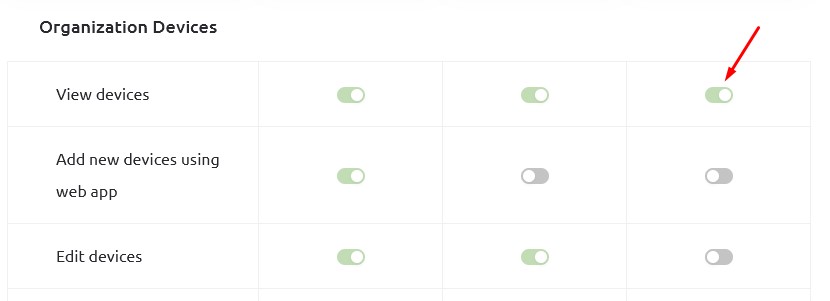
@vzaoral Hello, ability edit Roles And Permissions available only in PRO plan
View divices in organization permission turn on by default for all users
In this case there are no options.
Perhaps for this one device, create an account on a free plan
Regards
The Blynk folks should update the PLUS plan description to say “1 user, 10 devices” instead of “10 users, 10 devices.” The 9 remaining users are useless in the PLUS plan, they cannot do anything. It’s sad that they’re charging $83 bucks PER MONTH for a PRO plan just so my wife can access my thermostat. I know the PLUS is out of the picture. They promise that nothing was not going to change when the implemented the new billing plans, well they removed the user sharing device features, but I am still paying $7 bucks for a degraded plan.
Agreed.
That’s not true.
If you transfer ownership of the device to your wife then she will be able to control it, and you (as account owner/developer) will also be able to control it.
Pete.
Pete: Yes, that does indeed work – thank you for highlighting that. From my perspective, the main issue with Blynk lies in its documentation. This seems to be a common problem with many electronic devices and projects nowadays: the documentation is often poorly written. Where is it mentioned to do that: transfer ownership?
There have been some changes to the defaults for the permissions over the past year or so, most of which weren’t explained fully at the time and none of which make any logical sense to me, but we are where we are.
If you look at the Permissions screen then you’ll see what users can do with organisational and owned devices, which is where you can work-out that for users to be able to do anything they need to own the device.
Pete.
I successfully assigned a device to the user “user,” but I’ve discovered that the User cannot configure Wi-Fi access on the device—only an Admin can do so via the app 
Am I wrong? It can indeed be very beneficial for the “User” to perform the “Reconfigure” action to set up WiFi credentials.
Just use Arduino Cloud instead. I will change to arduino cloud for mye projects from now, and i will not use Blynk after that.
Thank I got it.  definitely
So:
we need to share our Admin account with collaborator.
because I don’t believe there is an option to upgrade this “User” profile capability only (remember I am referring to the user of my organization…no that one you mentioned here Pete
Thank you for response and dedication.