can you give me an example of what I need to change in regards to the if else statement?
Remove the word ‘else’
Pete.
Tried your suggestion, but no change in output
Latest code and serial output?
Pete.
#define BLYNK_PRINT Serial
#include <BlynkSimpleEsp8266.h>
//#include <SimpleTimer.h>
BlynkTimer timer;


char auth[] = "nn";

const int quarter = 12;  //d6 = 12 working good
const int half = 4; //
const int threeFourth = 14;
const int full = 5;

int flag0=0;  //below 25%
int flag1=0; //above 25%
int flag2=0; //above 50%
int flag3=0; //above 75%
int flag4=0; //at 100%
int flag5=0; //sensor error??

void setup()
{
  Serial.begin(9600);
  Blynk.begin(auth, "nnnnn", "nnn");
  pinMode(quarter, INPUT_PULLUP);
  pinMode(half, INPUT_PULLUP);
  pinMode(threeFourth, INPUT_PULLUP);
  pinMode(full, INPUT_PULLUP);

  timer.setInterval(5000L, buttonLedWidget);
  }


void buttonLedWidget()
{

Serial.print(digitalRead(quarter)); Serial.print(digitalRead(half)); Serial.print(digitalRead(threeFourth)); Serial.print(digitalRead(full));
Serial.println();


 if ((digitalRead(quarter)==HIGH) && (digitalRead(half)==HIGH) && (digitalRead(threeFourth)==HIGH) && (digitalRead(full)==HIGH)){      //if water level is below 25%
      if (flag0 == 0) {
Serial.print("Location A  ");
Serial.println("Tank is empty.....");
flag0=1; flag1=0; flag2=0; flag3=0; flag4=0; flag5=0;
Serial.print("Location A2  ");
 //  Blynk.notify("water is below 25%");
  }}

 if ((digitalRead(quarter)==LOW) && (digitalRead(half)==HIGH) && (digitalRead(threeFourth)==HIGH) && (digitalRead(full)==HIGH)){      //if water level is above 25%
      if (flag1 == 0) {
Serial.print("Location B  ");
Serial.println("Tank is quarter.....");
flag0=0; flag1=1; flag2=0; flag3=0; flag4=0; flag5=0;
Serial.print("Location B2  ");
// Blynk.notify("water is quarter full");
  }}

  if ((digitalRead(quarter)==LOW) && (digitalRead(half)==LOW) && (digitalRead(threeFourth)==HIGH) && (digitalRead(full)==HIGH)){     //if water level is above 50%
      if (flag2 == 0) {
Serial.print("Location c  ");
Serial.println("Tank is 50%.....");
flag0=0; flag1=0; flag2=1; flag3=0; flag4=0; flag5=0;
Serial.print("Location c2  ");
//Blynk.notify("water is half full");
  }}
   if ((digitalRead(quarter)==LOW) && (digitalRead(half)==LOW) && (digitalRead(threeFourth)==LOW) && (digitalRead(full)==HIGH)){     //if water level is above 75%
      if (flag3 == 0) {
Serial.print("Location d  ");
Serial.println("Tank is 75%.....");
flag0=0; flag1=0; flag2=0; flag3=1; flag4=0; flag5=0;
Serial.print("Location d2  ");
   //   Blynk.notify("water is three quarters full");
  }}
  if ((digitalRead(quarter)==LOW) && (digitalRead(half)==LOW) && (digitalRead(threeFourth)==LOW) && (digitalRead(full)==LOW)){     //if water tank is Full
      if (flag4 == 0) {
Serial.print("Location e  ");
Serial.println("Tank is full.....");
     flag0=0; flag1=0; flag2=0; flag3=0; flag4=1; flag5=0;
Serial.print("Location e2  ");
   //   Blynk.notify("water is 100% FULL");
}}

Serial.print("flag0 = "); Serial.println(flag0);
Serial.print("flag1 = "); Serial.println(flag1);
Serial.print("flag2 = "); Serial.println(flag2);
Serial.print("flag3 = "); Serial.println(flag3);
Serial.print("flag4 = "); Serial.println(flag4);
Serial.print("flag5 = "); Serial.println(flag5);
}


void loop()
{
  Blynk.run();
  timer.run();
}
output below
[6721] Ready (ping: 102ms).
1111
Location A  Tank is empty.....
Location A2  flag0 = 1
flag1 = 0
flag2 = 0
flag3 = 0
flag4 = 0
flag5 = 0
1111
flag0 = 1
flag1 = 0
flag2 = 0
flag3 = 0
flag4 = 0
flag5 = 0
0111
Location B  Tank is quarter.....
Location B2  flag0 = 0
flag1 = 1
flag2 = 0
flag3 = 0
flag4 = 0
flag5 = 0
0111
flag0 = 0
flag1 = 1
flag2 = 0
flag3 = 0
flag4 = 0
flag5 = 0
1011
flag0 = 0
flag1 = 1
flag2 = 0
flag3 = 0
flag4 = 0
flag5 = 0
1011
flag0 = 0
flag1 = 1
flag2 = 0
flag3 = 0
flag4 = 0
flag5 = 0
1101
flag0 = 0
flag1 = 1
flag2 = 0
flag3 = 0
flag4 = 0
flag5 = 0
1101
flag0 = 0
flag1 = 1
flag2 = 0
flag3 = 0
flag4 = 0
flag5 = 0
1110
flag0 = 0
flag1 = 1
flag2 = 0
flag3 = 0
flag4 = 0
flag5 = 0
1110
flag0 = 0
flag1 = 1
flag2 = 0
flag3 = 0
flag4 = 0
flag5 = 0
1111
Location A  Tank is empty.....
Location A2  flag0 = 1
flag1 = 0
flag2 = 0
flag3 = 0
flag4 = 0
flag5 = 0
1111
flag0 = 1
flag1 = 0
flag2 = 0
flag3 = 0
flag4 = 0
flag5 = 0
1111
Maybe you could approach the if statements a little differently to make things a little simpler. Why not check the pins from the top (full) down.
for example (sudo code, not working)…
if (full == LOW)
{
//full do stuff
}
else if (threeFourth == LOW)
{
//3/4 full do stuff
}
else if (half == LOW)
{
//half full do stuff
}
else if (quarter == LOW)
{
//quarter full do stuff
}
else
{
//empty do stuff
}
1 Like
Nowhere in this testing are you showing a situation where you’re getting a 0011 or 0001 or 0000 result from reading your pins.
I’m guessing that you aren’t actually filling the container up with water, simply shorting one contact at a time to the 'common` rail.
In practice, you can never have water touching the half pin without it also touching the quarter pin, yet that’s what’s happening when you get a 1011 result.
That’s a much better approach!
Pete.
To add to what @PeteKnight said.
you are getting 1011 for half full, but the if statement is looking for 0011 so it will never execute.
if ((digitalRead(quarter)==LOW) && (digitalRead(half)==LOW) && (digitalRead(threeFourth)==HIGH) && (digitalRead(full)==HIGH))
well this is embarassing. you were right. i was shorting rather than doing the immersing thing. It works fine now lol.
i dont have 12V circuit but using 5V directly from wemos. withing few seconds of dipping the sensors, in water i can see bubbles on the sensor lead lol.
To be honest I am not a big fan of this contact method, however i have tried the waterproof ultrasonic sensor to measure distance in this sump pit before but the results were not satisfactory.
the sump pit is only around 2 feet deep, circular in nature and is 2feet in diameter, with a 18" square opening on top. There is a submersible 1/3hp pump in the pit as well. Also there is pipe which dumps run off from the property into the pit. pit is made of plastic material.
what i noticed when i had that setup, during rain season, when the run off pipe would dump continously water into the pit, the water surface would bounce and that would give erratic measurements.
Also the ultrasonic sensor needs a minimum distance or otherwise it wont sense, plus the waves of the ultrasensor would widen as it went further from sensor. I m thinking may be it was hitting the pump, or wall of the pit, not sure but it wasnt reliable. Many times it gave me full notification and I would run to house only to find sump level was normal.
so eventually i gave up on it and wanted to this try this method, but on this contact method corrosion of leads is definitely an issue
secure a few float switches to a board or plastic pipe, and secure that inside the tank. Space them out in equal distances relative to tank capacity.
Something like these:
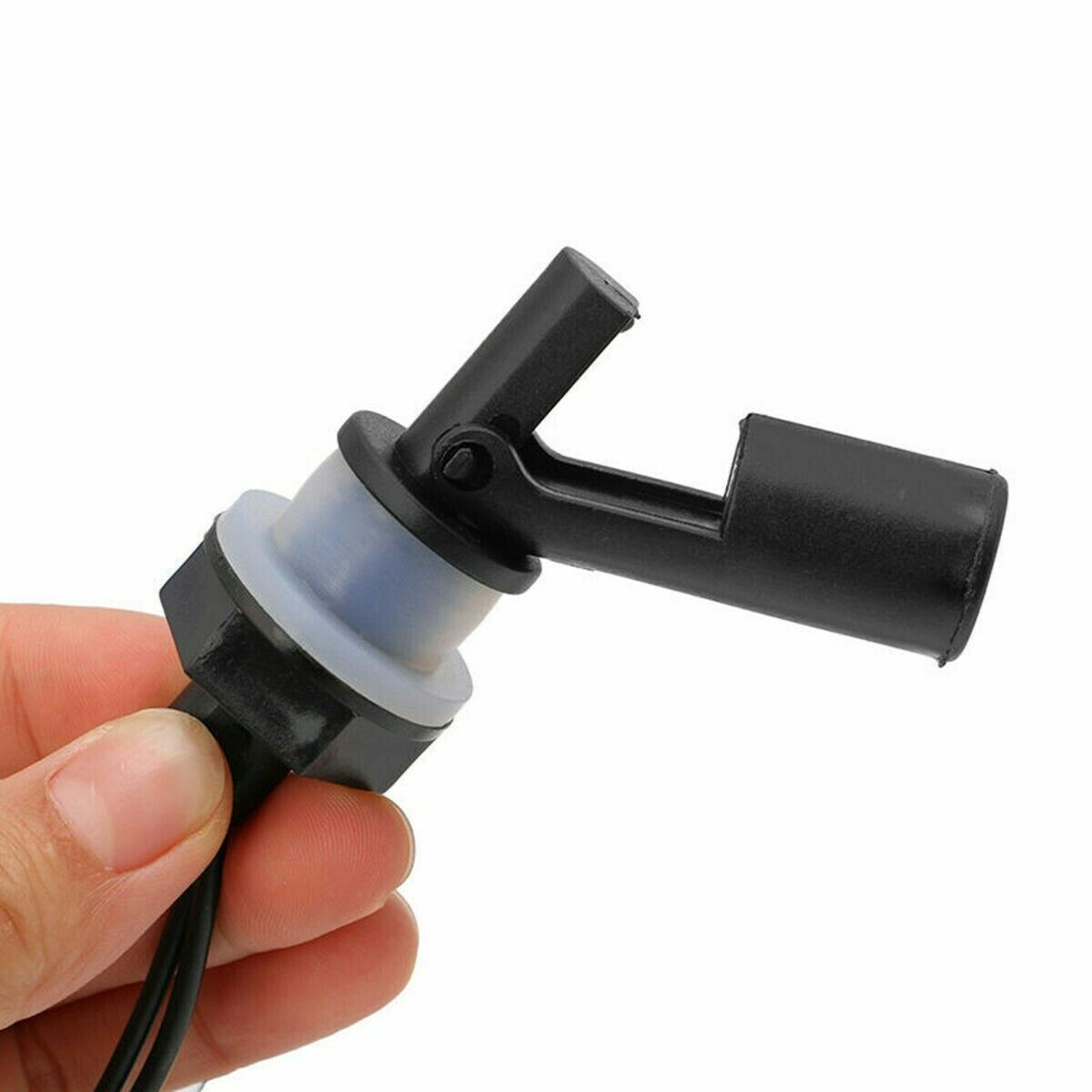
1 Like
do you have a link or model# so I can look them up? are they waterproof and submersible??
just an example. You can probably find these (or something very similar) all over the internet
Here are some you could maybe mount on the outside of the tank (be sure to check operating and output voltages).
As mentioned there are tons of these types of switches/devices.
These aren’t cheap, and need a 12-20v supply, but seem like a high quality solution…
https://wiki.dfrobot.com/Throw-in_Type_Liquid_Level_Transmitter_SKU_KIT0139
Id’d maybe do a ‘belt and braces’ approach of using a float switch near the top of the tank to be sure that you know when the level is high.
The only problem with many float switches is that they are designed for a fairly clean operating environment and can easily become jammed-up with silt/debris or dissolved salts and can be less reliable after a while.
You could work around this with a sketch that alerted you if you had an out of sequence result (like the 3/4 level sensor being activated without the 1/2 level sensor, indicating that either the 1/2 or 3/4 sensors were jammed).
Pete.
I verified (with switches, not water . . .) that the code works as expected for all water levels, using the pin assignments above . . . you have changed one of these pins . . .
Do you have your sensors connected to the correct pins?
Its working now so its all good. yes i did change one of the pin for some reason but didnt needed to.
I was just seeing if it was my pin selection that was causing the hiccup.
I actually just want jumper lead connected to wemos as mock simulation.
any had luck with ultrasonic waterproof sensor, apparently there are different kind, one that works better than better may be I bought one that wasnt the good kind and hence the not so satisfactory result
Maybe test ultrasonic sensor inside a 4” pipe running vertically. If you leave both ends open water can pass freely. This may still interfere with the accuracy but might give more consistent results.
I will give that a try. Thanks.
#define BLYNK_PRINT Serial
#include <ESP8266WiFi.h>
#include <BlynkSimpleEsp8266.h>
#include <ESP8266mDNS.h>
#include <WiFiUdp.h>
#include <ArduinoOTA.h>
#include <Blynk.h>
BlynkTimer Mytimer;

// Include NewPing Library
#include "NewPing.h"

// Hook up HC-SR04 with Trig to Arduino Pin 9, Echo to Arduino pin 10
#define TRIGGER_PIN 13
#define ECHO_PIN 12

// Maximum distance we want to ping for (in centimeters).
#define MAX_DISTANCE 73

char auth[] = "xxxxxx";

// NewPing setup of pins and maximum distance.
NewPing sonar(TRIGGER_PIN, ECHO_PIN, MAX_DISTANCE);
float duration, distancecm, distanceIN, distanceINbottom, level, percent;

void setup()
{
  Serial.begin(9600);
  Blynk.begin(auth, "xxxxxx", "xxxxx");
  Mytimer.setInterval(1000L, sensorread);

  Serial.println("Booting");
  WiFi.mode(WIFI_STA);
  WiFi.begin("xxxxx", "xxxxx");
  while (WiFi.waitForConnectResult() != WL_CONNECTED) {
    Serial.println("Connection Failed! Rebooting...");
    delay(5000);
    ESP.restart();
  }


  ArduinoOTA.setHostname("sump level status");


  ArduinoOTA.onStart([]() {
    String type;
    if (ArduinoOTA.getCommand() == U_FLASH) {
      type = "sketch";
    } else { // U_FS
      type = "filesystem";
    }

    // NOTE: if updating FS this would be the place to unmount FS using FS.end()
    Serial.println("Start updating " + type);
  });
  ArduinoOTA.onEnd([]() {
    Serial.println("\nEnd");
  });
  ArduinoOTA.onProgress([](unsigned int progress, unsigned int total) {
    Serial.printf("Progress: %u%%\r", (progress / (total / 100)));
  });
  ArduinoOTA.onError([](ota_error_t error) {
    Serial.printf("Error[%u]: ", error);
    if (error == OTA_AUTH_ERROR) {
      Serial.println("Auth Failed");
    } else if (error == OTA_BEGIN_ERROR) {
      Serial.println("Begin Failed");
    } else if (error == OTA_CONNECT_ERROR) {
      Serial.println("Connect Failed");
    } else if (error == OTA_RECEIVE_ERROR) {
      Serial.println("Receive Failed");
    } else if (error == OTA_END_ERROR) {
      Serial.println("End Failed");
    }
  });
  ArduinoOTA.begin();
  Serial.println("Ready");
  Serial.print("IP address: ");
  Serial.println(WiFi.localIP());
}


void sensorread()
{
  distancecm = sonar.ping_cm();

  distanceIN = (distancecm / 2.54);

  distanceINbottom =  (29 - distanceIN);   //actual depth is 28-3/4" inches

  level = (distanceINbottom / 29);

  percent = (level * 100);


  if (distancecm >= 73 || distancecm <= 2)
  {
    Serial.println("Out of range");
    Blynk.notify("Out of range!");
  }
  if (distancecm <= 23)
  {
    Serial.println("Sump Pump has Failed");
    Blynk.notify(String("Sump pump failure. Level= ") + level + String("%"));
  }
  else
  {
    Blynk.virtualWrite(V3, distanceIN);  //distance from sensor to surface of water in inches
    Blynk.virtualWrite(V4, distanceINbottom); //distance from bottom of sump pit to surface of water
    Blynk.virtualWrite(V6, percent); //level in percentage

  }
  delay(500);
}

void loop()
{
  ArduinoOTA.handle();
  Blynk.run();
  Mytimer.run();
}
Okay guys so I got a HC-sr04 ultrasonic sensor and thought i give it a try. I am running the above code. Everything seems to be working except one thing.
Currently the sensor is installed in my sump pit. I try to simulate a water level increase by placing a piece of place few inches away from the sensor it gives me a notification about sump pump failure. However the blynk superchat widget doesnt pick that up.
For example, lets say my sump has been at a level of 36% for the last few hours. Then I go to the sump pit to simulate a water level increase by placing a piece of paper or something few inches away from the sensor, the blynk app gives me notification saying sump pump failure level = 80% then i press ok on it and see the superchart widget, the level on superchart is still showing 36%, it would not update. However let say I remove the paper and the sensor read the measurement and plot it on superchart over night, I can see the level rising steadily over few hours and then dropping eventually when the float rises and sump pump kicks on.
If i put something really close to the sensor , then it gives me out of range notification. so this is working good as well.
Then second thing I would like to do is incorporate a blynk notification, when the sump pump kicks on and shuts off to let me know that the pump is working. Not sure how to do that. I know it kicks on around 48% +/- 1% and drops to about 33% +/-1%
You should read the section about granularity towards the end of the SuperChart documentation:
https://docs.blynk.cc/#widgets-displays-superchart
Basically, the data values that you send to the virtual pin are buffered for one minute, averaged then written to the database. This average value is displayed in Superchart.
You are taking 60 readings per minute. If the level is 36% and you trigger a single reading of 80% then this is what the numbers look like:
60 readings all at 36%…
36 * 60 = 2160
2160 / 60 = 36%
59 readings at 60% plus 1 reading at 80%…
36 * 59 + 1 x 80 = 2204
2204 / 60 = 36.73%
Personally, I wouldn’t use a notification for this. I’d probably use an additional datastream on the same SuperChart that plots the levels, and use a Binary chart.
To be 100% sure that the pump was running, as opposed showing to the relay that controls the pump is energised, I’d either place a current sensor in the supply to the pump and monitor the readings from that, or have a flow meter on the pump outlet pipe and monitor that.
I guess the flow meter is a more accurate indication that water is being pumped, as simply showing that the motor is drawing current could disguise the fact that the motor is stalled, the intake is clogged, or the outlet pipe has become disconnected. However, flow meters that use a little impellor to measure the movement of the water can become clogged with debris if the sump is a bit murky.
Of course, you could do both if you wanted a ‘belt and braces’ approach, and even have an addition pump that is controlled via the Wemos if you wished. It depends how paranoid you are!
Plotting water level and pump on/off times will show you useful data in SuperChart.
I’d probably add an alert if the water level goes above the pump trigger level and the pump isn’t running, then another if the water level goes above a critical level regardless of what the pump appears to be doing.
Pete.