I was in a weak area for cell coverage and had this box pop up. Once in good converage I have been unable to get this to clear even though I can see in the background the data updating on my devices. The cell phone is Samsung SM-911U using Android version 15. Blynk is version 1.25.0
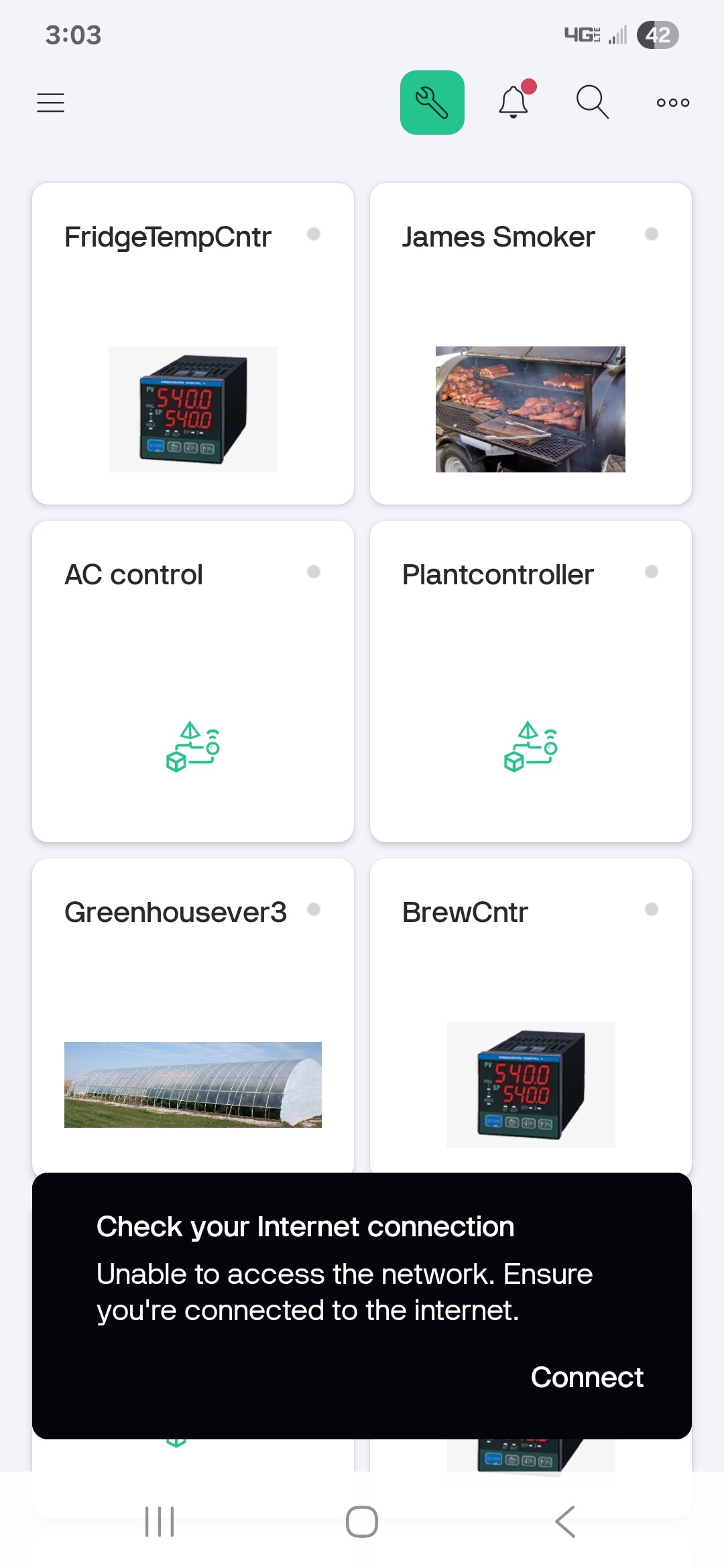
Hello @jstobaugh. Thanks for report. Should be fixed in next app version. 1.26.1 version should be available during next several days. Please check app updates.
Thanks.
Problem still persists with 1.26.1.
I clicked the connect button. I don’t have wifi enabled but I have clicked to enable it and connect to the network. Also I was expecting when it is communicating which I can see by the data changing on the screen for the device that the box would automatically go away.
@jstobaugh Popup should go away after connection to network (wifi or mobile internet)
automatically go away
This is the specificity of the implementation. It will not disappear by itself. You need to select a connection
Tested just now and it did clear on it’s own. I don’t know why it didn’t yesterday but if it happens again I will let you know.
1 Like
Ok so I am still having the problem. I enabled wifi and it is connected to the internet but i can’t get the box to clear. Swipping left or right doesn’t work. I am showing 4G but weak which is normal where I live. The only way to clear it is to force stop Blynk.
@jstobaugh Maybe this is some specificity of your phone model. What is your exact phone model and android version?
Ideally, if you could record a video of the behavior of this pop-up and at what stages it does not disappear.
Model and version are in first post. There is nothing to record. As soon as I open Blynk it shows the box. Usually after sitting overnight. I believe I have left it open in the background and not closed it the day before. I am at the fringe of coverage so my phone will routinely go in and out of service depending on where I am in my house.
This problem is getting worse for me. When I get the box to show up I force close the app and restart it. I then get the hourglass and it never clears until I connect my phone to wifi. It then clears and I can then unclick wifi and it transfers to Cell and works. All these problems showed up only a few weeks ago and I use Blynk daily so I would notice a problem fairly soon.
This box auto-hides when Internet connection is restored. That’s why, when you foreclose the app and restart, it shows you the progress of establishing a connection - it means you have been disconnected from Internet (no wifi and no cell).
You box isn’t auto hiding. I have learned to ignore the box as my data is being received even though the box says no internet. I can change settings on my devices and see the settings are taking place.
1 Like
Got it - I will try to reproduce it. Do you close/hide the app in between the pop-up has been shown?
In the next build, it will be hidden by a delay, and later we may introduce a different UI for the no internet case.
I just hide the app.