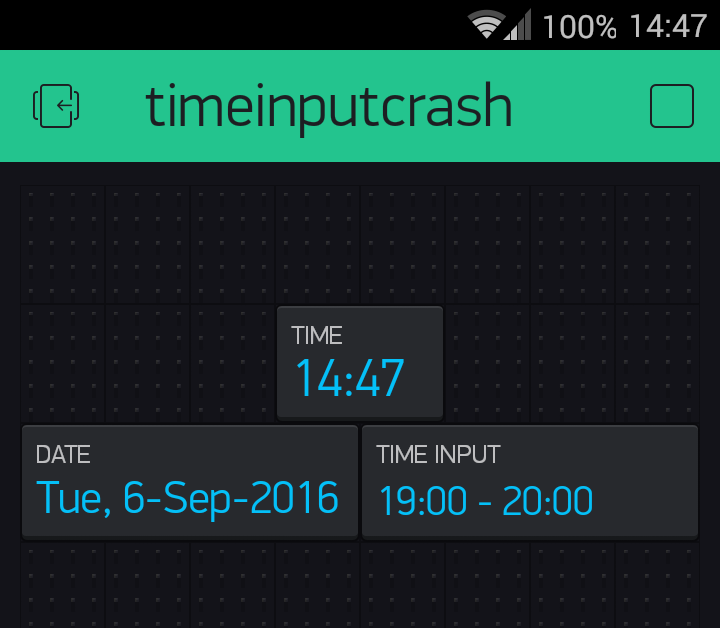
Hi guys,
just using Time Input Widget couple days now and experiencing system crash whenever I open/change the value of the widget, this is the trace on my serial:
[4248] Connected to WiFi
[4248] IP: 192.168.1.109
[4249] Blynk v0.3.8 on NodeMCU
[5001] Connecting to blynk-cloud.com:8442
[5073] Ready (ping: 1ms).
========================
= Sync to NTP Server   =
========================
6-9-2016 [3] - 16:47:27

++++++++++++++++++
1473180447
++++++++++++++++++
Now: 1473180467
Date: Tue, 6-Sep-2016 ---- 16:47
Now: 1473180487
Date: Tue, 6-Sep-2016 ---- 16:48
65460
65640
25200

Exception (28):
epc1=0x402018f0 epc2=0x00000000 epc3=0x00000000 excvaddr=0x00000000 depc=0x00000000

ctx: cont
sp: 3ffefb20 end: 3ffefea0 offset: 01a0

>>>stack>>>
3ffefcc0:  3ffe9ae0 00000001 00000001 00007fff
3ffefcd0:  00000000 00006270 32cccccc 30303235
3ffefce0:  00000000 00000001 3ffe8cd5 40205d90
3ffefcf0:  00000009 0000000b 0ccccccc 00007776
3ffefd00:  3ffefdf8 3ffefd80 3ffeee48 4020101c
3ffefd10:  3ffe8cd4 00006270 3ffeee48 40205347
3ffefd20:  3ffefdf8 3ffefdf8 00000001 4020102c
3ffefd30:  3ffefdf8 3ffefd80 3ffeee48 40202280
3ffefd40:  402240a6 3ffefd80 3ffeee48 4020251b
3ffefd50:  00000000 00000030 00000000 40202280
3ffefd60:  ffffffff 00000012 0000000b 40202cd4
3ffefd70:  3ffefde0 3fff111c 3fff0fec 40203d99
3ffefd80:  3ffefde6 00000012 00000012 40203dfa
3ffefd90:  3ffeea0b 000005df 3ffeee80 3ffefde6
3ffefda0:  3ffeec10 00000018 402058b8 3ffeee80
3ffefdb0:  00000000 3ffeea14 3ffeec10 3ffefdf0
3ffefdc0:  00000018 00000001 3ffeec10 40202faa
3ffefdd0:  00000000 3fffdad0 3ffeec10 40205930
3ffefde0:  31007776 35360031 00303634 34363536
3ffefdf0:  35320030 00303032 3ffefe00 402025ee <
3ffefe00:  18008814 3ffefe00 3ffeee80 3ffeec30
3ffefe10:  00000018 3ffefde0 402058b8 3ffeee80
3ffefe20:  00000000 00000000 3ffeec10 00000000
3ffefe30:  00000001 3ffeec30 3ffeec10 40203141
3ffefe40:  00000000 00000000 00000000 00000000
3ffefe50:  3ffeec30 00000000 00000000 40205274
3ffefe60:  3ffeee48 00000000 3ffeee6c 3ffeee74
3ffefe70:  3fffdad0 00000000 3ffeee6c 402032b7
3ffefe80:  3fffdad0 00000000 3ffeee6c 40205904
3ffefe90:  feefeffe feefeffe 3ffeee80 40100718
<<<stack<<<
(��ԅ��DH{�[256] Connecting to Camar-24
[4259] Connected to WiFi
[4259] IP: 192.168.1.109
[4260] Blynk v0.3.8 on NodeMCU
[5001] Connecting to blynk-cloud.com:8442
[5071] Ready (ping: 1ms).
========================
= Sync to NTP Server   =
========================
6-9-2016 [3] - 16:48:24

++++++++++++++++++
1473180504
++++++++++++++++++
And this is my sketch:
#define DEBUG
#define BLYNK_PRINT Serial    // Comment this out to disable prints and save space

#include <ESP8266WiFi.h>
#include <BlynkSimpleEsp8266.h>
#include <SimpleTimer.h>
#include <TimeLib.h>
#include <NTPtimeESP.h>


// -- NodeMCU PIN to ESP8266 ESP-12 Pinout
#define D0 16
#define D1 5               // LED 1 (Yellow)
#define D2 4               // LED 4 (White)
#define D3 0               // LED 2 (Green)
#define LED_internal_PIN 2 // LED Built In = GPIO-2 --> D4
#define D5 14              // LED 3 (Red)
#define D6 12
#define D7 13
#define D8 15
#define D9 3
#define D10 1

#define VDisplayTime V25
#define VDisplayDate V26
#define VTimeInput V27

const char auth[] = "9999999999999999999999999999"; //insert here your token generated by Blynk
const char ssid[] = "Camar-24";
const char pass[] = "*****************";

const String MyDayOfWeek[7] = {"Sun", "Mon", "Tue", "Wed", "Thu", "Fri", "Sat"};
const String MyMonth[12] = {"Jan", "Feb", "Mar", "Apr", "May", "Jun", "Jul", "Aug", "Sep", "Oct", "Nov", "Dec"};


NTPtime MyNTP("id.pool.ntp.org");
SimpleTimer timer;

int startTimeInSecs;
strDateTime dateTime;


// Utility function for digital clock display: prints preceding colon and leading 0
String printDigits(int digits)
{
  String new_digits = ":";
  if (digits < 10) {
    new_digits += "0";
  }
  new_digits += String(digits);
  return new_digits;
}

BLYNK_WRITE(V11) {
  startTimeInSecs = param[0].asInt(); // GMT+7


  #ifdef DEBUG
  Serial.println(startTimeInSecs);
  Serial.println(param[1].asInt());
  Serial.println(param[2].asInt());
  Serial.println(param[3].asInt());
  Serial.println(param[4].asInt());
  Serial.println(param[5].asInt());
  Serial.println(param[6].asInt());
  Serial.println(param[7].asInt());
  #endif
}

void CalibrateTimeWithNTP()
{
  // first parameter: Time zone in floating point; second parameter: 0 no daylight saving, 1 for European summer time;
  dateTime = MyNTP.getNTPtime(7.0, 0);

/*
  byte actualhour = dateTime.hour;
  byte actualminute = dateTime.minute;
  byte actualsecond = dateTime.second;
  int actualyear = dateTime.year;
  byte actualmonth = dateTime.month;
  byte actualday = dateTime.day;
  byte actualdayofWeek = dateTime.dayofWeek;
*/
  setTime(dateTime.hour, dateTime.minute, dateTime.second, dateTime.day, dateTime.month, dateTime.year); //(hours, minutes, seconds, days, months, years)

  #ifdef DEBUG
  Serial.println("========================");
  Serial.println("= Sync to NTP Server   =");
  Serial.println("========================");
  MyNTP.printDateTime(dateTime);
  #endif
}

void DisplayClock()
{
  String MyTime = String(hour())+ printDigits(minute());
  String MyDate = MyDayOfWeek[weekday()-1]+", "+String(day())+"-"+MyMonth[month()-1]+"-"+String(year());
  Blynk.virtualWrite(VDisplayTime, MyTime);
  Blynk.virtualWrite(VDisplayDate, MyDate);

  #ifdef DEBUG
  Serial.print("Now: ");
  Serial.println(now());
  Serial.print("Date: ");
  Serial.print(MyDate);
  Serial.print(" ---- ");
  Serial.println(MyTime);
  #endif

} // End: sendUptime()


/****************************************************
 * SETUP: Initialize for the first Time
 *****************************************************/
void setup()
{
  #ifdef DEBUG
  Serial.begin(9600); // See the connection status in Serial Monitor
  #endif

  Blynk.begin(auth, ssid, pass);
  while (Blynk.connect() == false) { } // Wait until connected
    // Wait until connected
  pinMode(D1, OUTPUT);
  pinMode(D2, OUTPUT);
  pinMode(D3, OUTPUT);
  pinMode(D5, OUTPUT);
  pinMode(LED_internal_PIN, OUTPUT);

  CalibrateTimeWithNTP();
  timer.setInterval(20000L, DisplayClock); // every 20 second
  timer.setInterval(3600000L, CalibrateTimeWithNTP); // every hour sync with NTP Server

  #ifdef DEBUG
  Serial.println();
  Serial.println("++++++++++++++++++");
  Serial.println(now());
  Serial.println("++++++++++++++++++");
  #endif
} // End: setup()


/****************************************************
 * LOOP: all the time
 *****************************************************/
void loop()
{
  Blynk.run(); // Initiates Blynk
  timer.run(); // Initiates SimpleTimer
} // End: loop()
I’m using NodeMCU ESP8266 and Android,
BTW I’m using “Simple Time Input for start time”, and always getting crash whenever I’m using “Advanced Time Input”
best regards and TIA