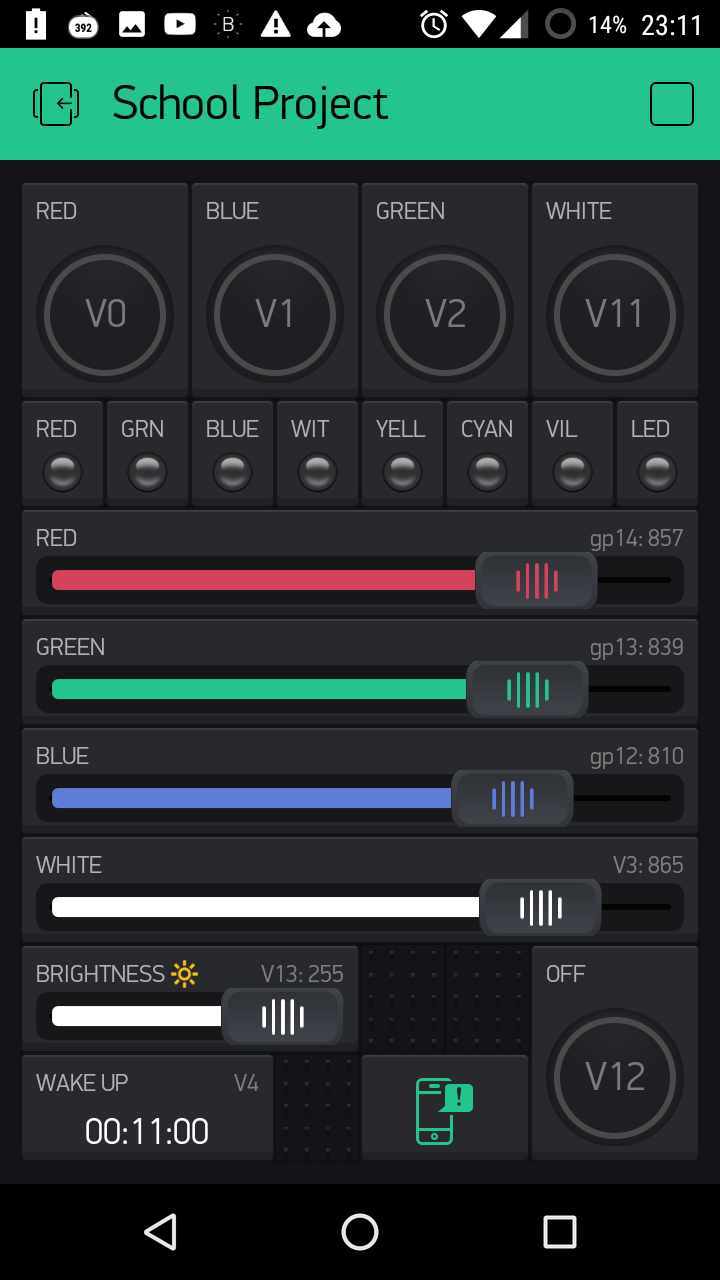
I am working on a project and need to control the brightness of the 3 leds RGB via the slider widget and cant seem to figure out how to write the code. Can some one edit my code. It is working perfectly but not the the slider and when I use widget led I am getting an error login timeout.
This is the working code
/**************************************************************
Blynk is a platform with iOS and Android apps to control
Arduino, Raspberry Pi and the likes over the Internet.
You can easily build graphic interfaces for all your
projects by simply dragging and dropping widgets.
     Downloads, docs, tutorials: http://www.blynk.cc
     Blynk community:            http://community.blynk.cc
     Social networks:            http://www.fb.com/blynkapp
                                 http://twitter.com/blynk_app

   Blynk library is licensed under MIT license
   This example code is in public domain.

 **************************************************************
   This example runs directly on ESP8266 chip.

   You need to install this for ESP8266 development:
     https://github.com/esp8266/Arduino

   Please be sure to select hte right ESP8266 module
   in the Tools -> Board menu!

   Change WiFi ssid, pass, and Blynk auth token to run :)

 **************************************************************/

#define BLYNK_PRINT Serial    // Comment this out to disable prints and save space
#include <ESP8266WiFi.h>
#include <BlynkSimpleEsp8266.h>
#define redpin 14
#define greenpin 12
#define bluepin 13
#define redvirt 5
#define grnvirt 6
#define bluevirt 7
#define witvirt 8
#define yellvirt 9
#define cyanvirt 10
#define vilvirt  14

// You should get Auth Token in the Blynk App.
// Go to the Project Settings (nut icon).
char auth[] = "8374e7ea0b454xxxxxxxxxxxxxxxxx";

void setup()
{
  Serial.begin(9600);
  Blynk.begin(auth, "CxxxxxxxxWi-Fi", "xxxxxxxx");

  pinMode(redpin, OUTPUT);
  pinMode(bluepin, OUTPUT);
  pinMode(greenpin, OUTPUT);
  digitalWrite(redpin, LOW);
  digitalWrite(greenpin, LOW);
  digitalWrite(bluepin, LOW);
}


BLYNK_WRITE(V0) // At global scope (not inside of the function)
{
  if ( param.asInt() == 1 )
  {
    digitalWrite(redpin, HIGH);

  }
  else
  {
    digitalWrite(redpin, LOW);

  }
}

BLYNK_WRITE(V1) // At global scope (not inside of the function)
{
  if ( param.asInt() == 1 )
  {
    digitalWrite(greenpin, HIGH);

  }
  else
  {
    digitalWrite(greenpin, LOW);

  }
}

BLYNK_WRITE(V2) // At global scope (not inside of the function)
{
  if ( param.asInt() == 1 )
  {
    digitalWrite(bluepin, HIGH);
  }
  else
  {
    digitalWrite(bluepin, LOW);
  }
}

BLYNK_WRITE(3) // At global scope (not inside of the function)

{
  analogWrite(redpin, param.asInt());
  analogWrite(bluepin, param.asInt());
  analogWrite(greenpin, param.asInt());
}


BLYNK_WRITE(V4) // At global scope (not inside of the function)
{
  if ( param.asInt() == 1 )
  {
    analogWrite(redpin, 1);
    analogWrite(greenpin, 1);
    analogWrite(bluepin, 1);
  }
  else
  {
    analogWrite(redpin, 0);
    analogWrite(greenpin, 0);
    analogWrite(bluepin, 0);
  }
}

BLYNK_WRITE(V11) // At global scope (not inside of the function)
{
  if ( param.asInt() == 1 )
  {
    digitalWrite(redpin, HIGH);
    digitalWrite(greenpin, HIGH);
    digitalWrite(bluepin, HIGH);
  }
  else
  {
    digitalWrite(redpin, LOW);
    digitalWrite(greenpin, LOW);
    digitalWrite(bluepin, LOW);
  }
}


BLYNK_WRITE(V12) // At global scope (not inside of the function)
{
  if ( param.asInt() == 1 )
  {
    digitalWrite(redpin, LOW);
    digitalWrite(greenpin, LOW);
    digitalWrite(bluepin, LOW);
  }
  else
  {
    digitalWrite(redpin, LOW);
    digitalWrite(greenpin, LOW);
    digitalWrite(bluepin, LOW); //off
  }
}

void loop()
{
  Blynk.run();
}
And Dashboard