Hello, everyone;
I’m new to the community; I’ve already read a lot of discussions and taken parts of code to make some of my projects with blynk;
In my last project I’m having some whims with the connection to the blynk server; I’d like a help to understand how to solve the problems;
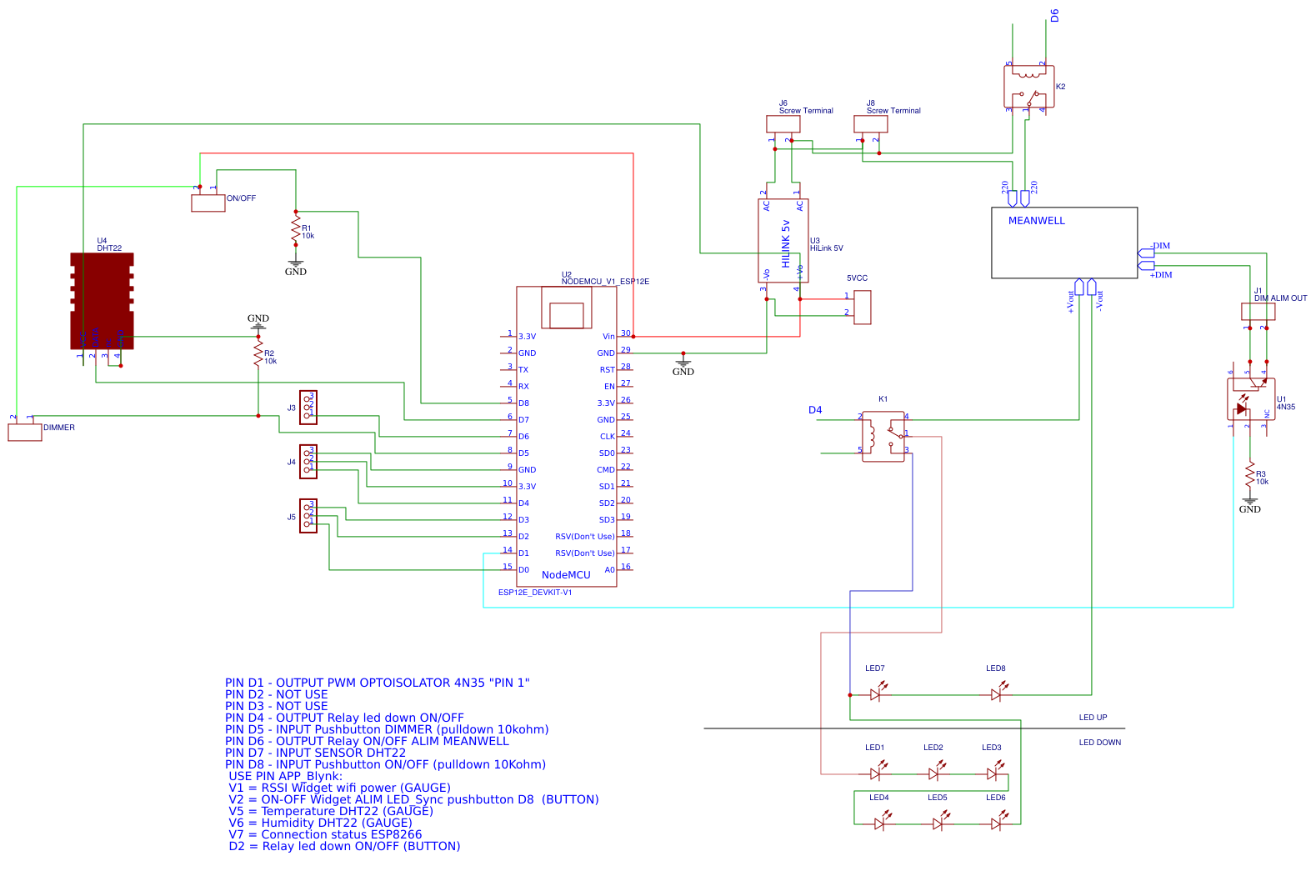
Here is a description of the whole project:
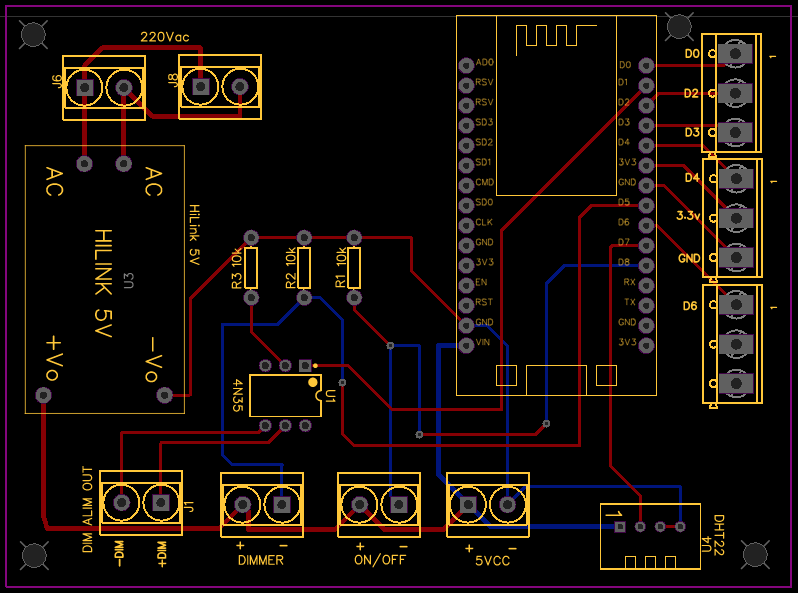
Circuit PCB:
https://easyeda.com/antonino.dattola/led-lamp
At first, I had a very strange behavior with esp, from the blynk app appeared the notification that esp was offline, and the output pins changed state; it happened several times in 2 days, so I had light on unintentionally…
The RSSI wifi value was about -80dBm (the router is about 5mt away and is separated by only 1 wall)
I thought of changing esp, I took another esp and replaced , the value of RSSI fell to -50dBm
Since last night no strange problem of change of state of output ;
After about 5 minutes appeared esp disconnect notification from blynk app; then I think through the pc to send ping to esp to understand if it is a device reset or a problem on the server side so I do: ping -t 192.168…
the answer always happens with a time of about 3ms, very fast.
I wait as long as after about 20 minutes returns the app to give notification of disconnection, but the ping has always had a positive response.
Closed the ping so as not to occupy the esp in useless answers.
This morning at 8:35 a.m. notification blynk app esp offline until 10:35 a.m.; I switch off the power supply and it restores quickly.
May be problems due to the very low delay() inside the code ?
Is the server where I connect correct?
Can the cili timer.setintervall of 100L duration be a problem? They are the control of the buttons on the wall.
Details Hardware :
• NodeMCU V2 (ESP12E) - Wifi
• Router Fritzbox 3490
• Smartphone Android Xiaomi MI 9T
• Blynk server
• Blynk Library version 0.6.1
/*
The project foresees that the chandelier can be controlled by blynk apps for smartphones, and by 2 buttons on the wall.
The controls to drive the chandelier from the blynk app are 3:
-On or off (also with timer)
-Change of brightness
-Deactivation or activation of the LEDs installed at the bottom. To have only indirect light bouncing from the ceiling.
There are 2 controls on the wall:
-Button for on/off control
-Button for changing brightness
to improve the chandelier and make it more “smart”, a DHT22 sensor has been inserted to control the temperature and humidity of the room.
During the connection time of the esp, (about 5-8 seconds) it is not possible to manage the buttons on the wall; if the connection to the server is not established,
a timer of 30sec is activated that allows to use the buttons on the esp.
/*
-------------------------------------------------------

     USE PIN ESP8266:

    PIN D1 - OUTPUT PWM OPTOISOLATOR 4N35 "PIN 1"
    PIN D2 - NOT USE
    PIN D3 - NOT USE
    PIN D4 - OUTPUT Relay led down ON/OFF
    PIN D5 - INPUT Pushbutton DIMMER (pulldown 10kohm)
    PIN D6 - OUTPUT Relay ON/OFF ALIM MEANWELL
    PIN D7 - INPUT SENSOR DHT22
    PIN D8 - INPUT Pushbutton ON/OFF (pulldown 10Kohm)


     USE PIN APP_Blynk:

     V1 = RSSI Widget wifi power (GAUGE)
     V2 = ON-OFF Widget ALIM LED_Sync pushbutton D8  (BUTTON)
     V5 = Temperature DHT22 (GAUGE)
     V6 = Humidity DHT22 (GAUGE)
     V7 = Connection status ESP8266
     D2 = Relay led down ON/OFF (BUTTON)

    */
This text will be hidden
#include <ESP8266WiFi.h>
#include <BlynkSimpleEsp8266.h>
#define BLYNK_PRINT Serial
#include <DHT.h>
#define VPIN V2
#define VPIN1 V1
#define DHTPIN D7
#define DHTTYPE DHT22

WidgetLED led1(V7); //connection status led widget

char auth[] = "dNqLnA0MTYweGy_Jz04M_3yuT1U0uYRj"; //token blink app
char ssid[] = "FRITZ Claudio"; //ssid wifi
char pass[] = "Dattola100"; //password wifi
//char server[] = "xxx.xxx.xxx.xxx";  // IP for Local Cloud Server
char server[] = "blynk-cloud.com";  // URL for Blynk Cloud Server
int port = 8080;

int DeviceLED = 2; //led onboard esp
int ReCnctFlag;  // Reconnection Flag
int ReCnctCount = 0;  // Reconnection counter

float h; //dht22
float t; //dht22

BlynkTimer timer;
DHT dht(DHTPIN, DHTTYPE);


void lightOn();
void lightOff();

boolean LampState = 0;
boolean SwitchReset = true;

const int PULSANTE_EXT = D8;
const int ALIM = D6;

const int BUTTON_DIMMER = D5;
const int LED = D1;

//---------------setup dimmer button------------

int dir = 70; //step dimmer +e-
int lum = 0;
boolean toggle = false;

//-----------------------------------------------

void setup()
{
  Serial.begin(115000);
  pinMode(2, OUTPUT); //led board esp
  pinMode(D2, OUTPUT);// Relay led down ON/OFF
  pinMode(ALIM, OUTPUT);
  pinMode(PULSANTE_EXT, INPUT);
  pinMode(BUTTON_DIMMER, INPUT);
  pinMode(LED, OUTPUT);
  delay(10);
  digitalWrite(ALIM, HIGH);
  digitalWrite(2, HIGH);   //spegni led ESP
  digitalWrite(D2, HIGH); // relay led down 0
  WiFi.begin(ssid, pass);  // Non-blocking if no WiFi available
  Blynk.config(auth, server, port);
  Blynk.connect();
  timer.setInterval(100L, ButtonCheck); //ciclo button on/off
  timer.setInterval(100L, dimmerled); // ciclo dimmerled
  timer.setInterval(4000L, myTimerEvent); //dht22 4sec
  timer.setInterval(1000L, rssi); //rssi power wifi
  timer.setInterval(1000L, blinkLedWidget); //
  //Blynk.syncVirtual(V2); //sync app blynk pin V2

  dht.begin();
  Serial.println("DHT22 Blynk ready !!!");

}

BLYNK_CONNECTED() {
  Serial.println("Connected");
  ReCnctCount = 0;
}
//-----------------------------------------------------------------------------------------------------
void loop() {
  timer.run();

  if (Blynk.connected()) {  // If connected run as normal
    Blynk.run();
  } else if (ReCnctFlag == 0) {  // If NOT connected and not already trying to reconnect, set timer to try to reconnect in 30 seconds
    ReCnctFlag = 1;  // Set reconnection Flag
    Serial.println("Starting reconnection timer in 30 seconds...");
    timer.setTimeout(30000L, []() {  // Lambda Reconnection Timer Function
      ReCnctFlag = 0;  // Reset reconnection Flag
      ReCnctCount++;  // Increment reconnection Counter
      Serial.print("Attempting reconnection #");
      Serial.println(ReCnctCount);
      Blynk.connect();  // Try to reconnect to the server
      //Blynk.syncVirtual(V2);
    });
  }
}

//-----------------------------------------------Button ON/OFF------------------------------------------

void ButtonCheck() {
  boolean SwitchState = (digitalRead(PULSANTE_EXT));
  Blynk.virtualWrite(V2,LampState); //Aggiorna il widget blynk on/off sincronizzato con pulsante ext
   if (!SwitchState && SwitchReset == true) {
    if (LampState) {
      lightOff();
    } else {
      lightOn();
    }
    SwitchReset = false;
    delay(50);
  }
  else if (SwitchState) {
    SwitchReset = true;
  }
}
void ToggleRelay() {
  LampState = !LampState;
  if (LampState) {
       lightOn();
  }
  else lightOff();
}
void lightOn() {
    digitalWrite(ALIM, LOW);
    LampState = 1;
}
void lightOff() {
    digitalWrite(ALIM, HIGH);
    LampState = 0;

}

//---------------------------------------DIMMER LED BUTTON-------------------------------------

void dimmerled() {
   if (digitalRead(BUTTON_DIMMER) == HIGH) {
    toggle = true;
    lum += dir;
    if ((lum >= 0) && (lum < 840))
      analogWrite(LED, lum);
    delay(20);
  } else { // toggle direction
    if (toggle) {
      dir = -1 * dir;
      toggle = false;
    }
  }
}


BLYNK_WRITE(VPIN) {
  int SwitchStatus = param.asInt();
    if (SwitchStatus == 2){
    ToggleRelay();
  }
  else if (SwitchStatus){
    lightOn();
  }
  else lightOff();
}

//-------------------------------------DHT22----------------------------------------------------
void myTimerEvent() {
  getData();

  Blynk.virtualWrite(V5, t);//Temp for widget blynk
  Blynk.virtualWrite(V6, h);//humidity for widget blynk
}

void getData() {
  h = dht.readHumidity();
  t = (dht.readTemperature());

  if (isnan(h) || isnan(t)) {
    Serial.println("Failed to read from DHT sensor!");
    return;
  }


  Serial.print("Humidity: ");
  Serial.print(h);
  Serial.print(" %\t");
  Serial.print("Temperature: ");
  Serial.print(t);
  Serial.println(" *C ");
}

//-------------widget rssi wifi--------------------
void rssi() {

Blynk.virtualWrite(V1, WiFi.RSSI()); //Signal strengt wifi

}

//-----------widget vitality esp connect-----------
void blinkLedWidget()
{
  if (led1.getValue()) {
    led1.off();
    //Serial.println("LED on V1: off");
  } else {
    led1.on();
    //Serial.println("LED on V1: on");
  }
}