Something changed recently with the Numeric Input widget. If you use the keypad to input numbers and first do the backspace key to remove all the numbers when you input numbers they are entered in backwards order. So if you input 157 it will display 751.
Hey Blynk can you at least reply that you saw this?
Hello @jstobaugh.
I’ve checked many times in the web console, and for me, this bug does not reproduce.
Below, I have attached an example showing the widget working correctly, following your steps.
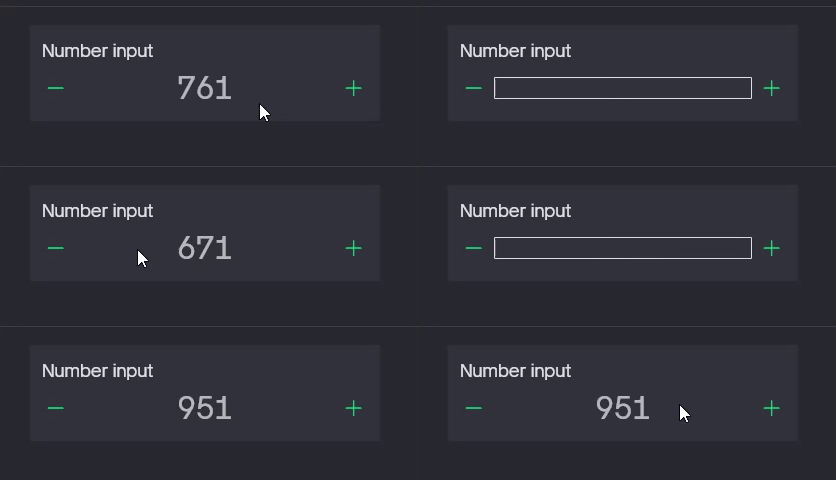
If this is happening to you, please provide more details. Which browser (and version) are you using, what is your operating system, and are there any other relevant details?
The browser question matters here. @jstobaugh, since it reproduces for you and not in the web console, it could be a mobile or in-app browser rendering the keypad differently. I’d also check whether the backspace is leaving an empty string versus a null value, since some widgets reorder input when the field starts in an unexpected state. If you can share the device, app version, and whether it’s a custom build, that would narrow it down.
@jstobaugh, the backspace state idea is worth testing directly. If the field is left as an empty string rather than cleared entirely, the widget may be appending each key at the front instead of the end, which matches the reversed 751. Since it won’t reproduce in the web console, note the exact device, app build, and whether the keypad is the native or custom one. Comparing behaviour on a second browser on the same device would also show whether it’s rendering-related or a genuine widget state bug.
The empty-string versus null distinction seems the most testable lead. One quick check: enter digits, press backspace once without clearing everything, then continue typing. If that also reverses, it points to key position handling rather than the fully cleared state. Recording each keypress order in the console while it happens would confirm where the new character lands. Also worth noting whether the custom keypad sends one event per tap or a batched value, since that changes how the field reconstructs the string.
I am running it on a Samsung s26+, Android version17. Blynk version 1.30.0. The link will show what I see. https://drive.google.com/file/d/1D_cskHYECQOPWxZtJIhdNAz6cr7M1Ct-/view?usp=sharing