Hi All,
I am new to the community and new to Blynk, but despite this I am a Blynk enthusiast and I want to say a huge thank you to everybody involved in this amazing project!
My question regards a specific sentence in the Blynk documentation “With Eventor Time Event you can assign multiple timers on same pin”. What does it means exactly? Is there any way to link “timers” with “eventor”? Just suppose that I’d like to start a timer once a week instead of doing it every day, is there any way to use eventor with an embedded timer or do I have to code it?
I am using ESP32 with Android if it helps.
Just means that you can create multiple events, each using different times (within the Eventors timer option) to control the same pin if you so desired.
Hi Gunner and thanks for the prompt reply. Let me try to express a bit better my needs. Suppose that everyday I have to open a valve at 10.00, then after 1 minute start a pump, and at 11.00 stop the pump and close the valve. This can easily be done using two timers.
Now, suppose that I just want to performe this task once or twice a week. Is there any possibility to embedd the two timers (valve and pump) in an eventor?
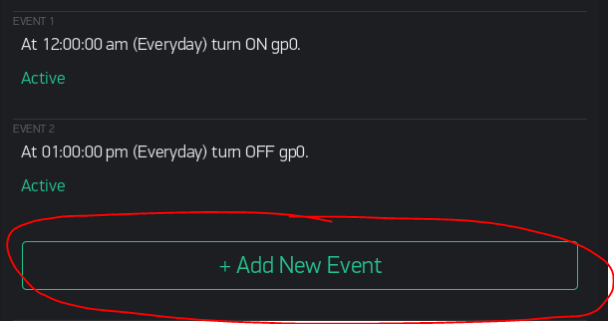
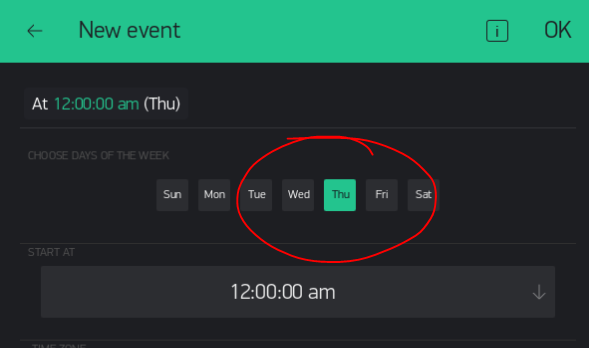
I did embed two timers in my 2nd pictured example… They just happen to both be set for everyday and the same vPin (just as an example of flipping a vPin on and off)… but each (and any others) could have been completely different times, days, vPins, as well as actions. Your choice.
Thanks Gunner, you are right (of course ), just my fault in trying to add a new event following the previous one (where the app says: nice, you can add a new event!) Instead of clicking OK and adding a new time event. Really a stupid thing, sorry guys. Anyway thanks a lot for your help and you can consider this as solved!


 ), just my fault in trying to add a new event following the previous one (where the app says: nice, you can add a new event!) Instead of clicking OK and adding a new time event. Really a stupid thing, sorry guys. Anyway thanks a lot for your help and you can consider this as solved!