Hello, few days ago I bought a SparkFun Blynk board and I decided to try programming it with the Arduino IDE but it gives me this error:
Arduino: 1.6.9 (Windows 10), Board: “SparkFun Blynk Board, 80 MHz, Serial, 115200, 4M (1M SPIFFS)”
Board sparkfunBlynk (platform esp8266, package esp8266) is unknown
Error compiling for board SparkFun Blynk Board.
This report would have more information with
“Show verbose output during compilation”
option enabled in File -> Preferences.
I’ve done the two steps you describe. I have SparkFun Blynk Board selected in Tools>Boards
When I click on Tools>Get Board Info, it give me this
BN: Unknown board
VID: 0403
PID: 6015
SN: Upload any sketch to obtain it
The hardware itself should be good. I was using no problem with the smartphone app. Also tried it on a different USB port. Error message is always the same:
Just do the Blynk board stuff and don’t bother with any libraries.
Then try to compile this impressive sketch that I wrote (but please don’t share it with anyone)
Yes, that’s why I stopped using the “live” IDE a couple of years ago. I always use the portable install as you know where everything is. Much easier for testing different versions of Blynk and the Core etc. Presumably you went with the portable install. Technically it means you can pop it on a USB and code at your Mum’s house when you pop round for tea.
I’m not called Costas the coder for nothing
Minimal libraries, minimnal variables, short setup() , perfect loop() and well commented. Blynkers could learn a lot from this powerful sketch.
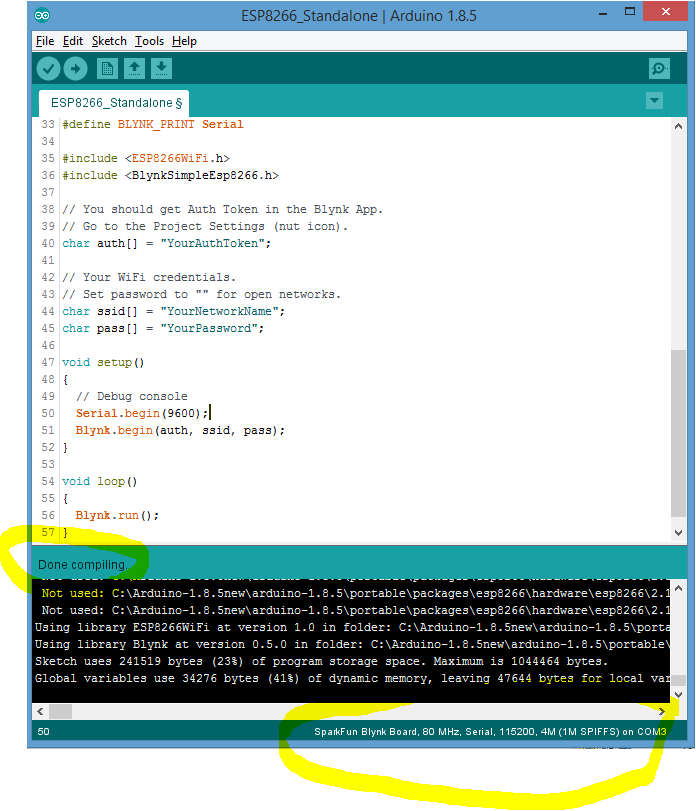
 Tks~
Tks~
