Yes, that I know, but I think it’s not normal to get redirected to blynk.cc after trying the get to the admin panel by going to https://192.168.1.112:9443
And when I scan the ports with Fing I only get
Port 22 ssh
Port 2020 xinupageserver
Port 8443 https-alt
This was recently changed right? In 0.22.3 I could just get there without the /admin…
No. It never worked without “admin” part.
Ohh, my mistake. Never seen the admin before, I think…
Anyway, thanks!
@hutje maybe your browser was auto-completing the url based on your previous visits to …/admin but it’s always required the /admin directory.
I think that’s it. My previous pi was .107 and now with the PiZero it is .112 so it is not completing indeed.
Thanks for the help.
Just a dumb fault of overseeing…
@hutje,
I’ve got an old version of “server.properties” and I had to change from 7443 to 9443 manually:
That’s the piece of the file before change it.
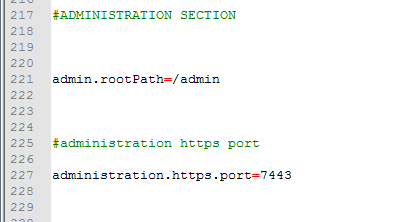
Are you in the same situation?
Port property is no longer used. You may remove it.
Yes, for sure… I must update the file…It was a small shortcut after update the Local Server…too busy “playing” with other stuff…
Edit: Update done and working…
Hi, I’m running a local server (0.22.3), and since the beginning I had to make some changes in the server.properties file, in order to find some place in my crowded local network:
http_port=8090
ssl.websocket.port=8091
tcp.websocket.port=8092
Now I’m a bit confused about what I’m supposed to do after the upgrade to 0.23.1 to keep everything working properly.
In my understanding, I should set everything this way:
http_port=8090  (to continue avoiding collision with the current 8080 port in my local net)
ssl.websocket.port  (remove the line from config file)
tcp.websocket.port (remove the line from config file)
Can you please confirm?
Hi.
Correct.