That looks fine. Are you uploading the correct sketch, and how are you identifying that it’s the old sketch rather than the new one that’s running?
Pete.
That looks fine. Are you uploading the correct sketch, and how are you identifying that it’s the old sketch rather than the new one that’s running?
Pete.
yea,
I loaded a sample code from Autoconect to see if the problem was the code I’m trying to load, the sample code loaded, only the network ssid did not appear.
I have no idea what this means.
The simplest way to tell if your latest code is running is to add a serial print message immediately after your Serial.begin command and see if it appears in your serial monitor.
Pete.
yes, the code message appears.
So the code is uploading and being saved.
Pete.
The current code is not, the message that appears and the code that was already inside ESP8266.
If the ESP was previously connected to your WiFi (even with different code), it will bypass autoconnect. If you want to see the autoconnect access point appear, turn off your router before starting the ESP. It will only creat the access point when it can’t connect to the last successful SSID.
I managed to connect, did what you asked for, turned off the router and turned on the ESP8266 before turning on the router, then it appeared.
Hahahaha …
But there is another problem, my Echo Dot is not finding the device, what could it be?
@luciano0609 I’ve split your questions off into this new topic, to reduce the clutter in the original topic, and because your project is sufficiently dissimilar to the original.
Please use this new topic to continue this conversation.
Pete.
/* Wemo / Hue emulation for ESP8266 control with Alexa, Blynk and IFTTT.
 *
 * https://github.com/tzapu/WiFiManager
 * https://github.com/Aircoookie/Espalexa
 * https://www.blynk.cc/
 *
 * Can be configured for either ON/OFF control or analog (PWM). If using a Blynk slider,
 * assign a range of 0-255 to the widget.
 *
 * For IFTTT control, use the Maker Channel with the following settings:
 *    URL: http://blynk-cloud.com:8080/YOUR_TOKEN/V1       Substitute your own token and vitual pin
 *    Method: PUT
 *    Content type: application/json
 *    Body: {"1"]                                          Use 0 for OFF, 1 for ON. For custom levels use 0-255.
 */
#define BLYNK_PRINT Serial
#include <ESP8266WiFi.h>
#include <DNSServer.h>
#include <ESP8266WebServer.h>
#include <WiFiManager.h>
#include <Espalexa.h>
#include <ArduinoOTA.h>
#include <SPI.h>
#include <MFRC522.h>
#include <EEPROM.h>
#include <BlynkSimpleEsp8266.h>

//  Device customizations  //////////////////////////////////////////////////////////////////////////////////////////
#define VPIN V3
#define SS_PIN D8
#define RST_PIN D4
#define BTN_PIN D1
#define SLN_PIN D2                //Use a unique virtual pin for each device sharing the same Blynk token / dashboard
char auth[] = "m2plDXAedN9ovefvGCrsbTX-oLX2ip53"    ;   //Get a token from Blynk
char DeviceName[] = "Botao Portao"; // How you want the switch to be named in the Alexa app
boolean UsingPWM = false;         // "False" if using a relay and Blynk button. "True" if using PWM and Blynk slider.
//const int OutputPin = D2;         // Output pin to a relay or PWM device. The onboard relay on a Sonoff is pin 12.
/////////////////////////////////////////////////////////////////////////////////////////////////////////////////////
MFRC522 mfrc522(SS_PIN, RST_PIN);
unsigned long uidDec, uidDecTemp;
int ARRAYindexUIDcard;
int EEPROMstartAddr;
long adminID = 1122539531;
bool beginCard = 0;
bool addCard = 1;
bool skipCard = 0;
int LockSwitch;
unsigned long CardUIDeEPROMread[] = {0, 1, 2, 3, 4, 5, 6, 7, 8, 9};
int PiezoPin = D3;


Espalexa espalexa;
WidgetLCD lcd(V0);

void setup(){
  Serial.begin(115200);

  WiFiManager wifi;
  wifi.autoConnect("EspalexaPortao"); // Connect to this access point the first time you use the device

  // Initialize the new device
  espalexa.addDevice(DeviceName, UpdateSwitch1); //Parameters: (device name, callback function)
  espalexa.begin();

  pinMode(SLN_PIN, OUTPUT);   // This can be used for either a relay or PWM output
  digitalWrite(SLN_PIN, LOW);
  pinMode(BTN_PIN, INPUT_PULLUP);
  pinMode(PiezoPin, OUTPUT);

  SPI.begin();
  mfrc522.PCD_Init();

  Blynk.config(auth);
  lcd.clear(); //Use it to clear the LCD Widget
  EEPROM.begin(512);
  DisplayWAiT_CARD();
  EEPROMreadUIDcard();

  digitalWrite(PiezoPin, HIGH), delay(100), digitalWrite(PiezoPin, LOW);

  ArduinoOTA.begin();
}

void loop()
{
  digitalWrite(SLN_PIN, LOW);

  if (digitalRead(BTN_PIN) == LOW) {
    digitalWrite(SLN_PIN, HIGH); //unlock
    lcd.print(0, 0, " BUTTON UNLOCK ");
    lcd.print(0, 1, "   DOOR OPEN   ");
    digitalWrite(PiezoPin, HIGH), delay(200), digitalWrite(PiezoPin, LOW);
    delay(2000);
    DisplayWAiT_CARD();
  }

  if (beginCard == 0) {
    if ( ! mfrc522.PICC_IsNewCardPresent()) {  //Look for new cards.
      Blynk.run();
      return;
    }

    if ( ! mfrc522.PICC_ReadCardSerial()) {  //Select one of the cards.
      Blynk.run();
      return;
    }
  }

  //Read "UID".
  for (byte i = 0; i < mfrc522.uid.size; i++) {
    uidDecTemp = mfrc522.uid.uidByte[i];
    uidDec = uidDec * 256 + uidDecTemp;
  }

  if (beginCard == 1 || LockSwitch > 0)EEPROMwriteUIDcard();  //uidDec == adminID

  if (LockSwitch == 0) {
    //CardUIDeEPROMread.
    for (ARRAYindexUIDcard = 0; ARRAYindexUIDcard <= 9; ARRAYindexUIDcard++) {
      if (CardUIDeEPROMread[ARRAYindexUIDcard] > 0) {
        if (CardUIDeEPROMread[ARRAYindexUIDcard] == uidDec) {
          lcd.print(0, 0, "CARD ACCESS OPEN");
          lcd.print(3, 1, uidDec);
          digitalWrite(SLN_PIN, HIGH); //unlock
          digitalWrite(PiezoPin, HIGH), delay(200), digitalWrite(PiezoPin, LOW);
          delay(2000);
          break;
        }
      }
    }

    if (ARRAYindexUIDcard == 10) {
      lcd.print(0, 0, " Card not Found ");
      lcd.print(0, 1, "                ");
      lcd.print(0, 1, "ID : ");
      lcd.print(5, 1, uidDec);
      for (int i = 0; i <= 2; i++)delay(100), digitalWrite(PiezoPin, HIGH), delay(100), digitalWrite(PiezoPin, LOW);
      digitalWrite(SLN_PIN, LOW);  //lock();
      delay(2000);
    }

    ARRAYindexUIDcard = 0;
    DisplayWAiT_CARD();
  }
  espalexa.loop();
   Blynk.run();
   ArduinoOTA.handle();
  }

BLYNK_WRITE(V1) {
  int a = param.asInt();
  if (a == 1) beginCard = 1; else beginCard = 0;
}

BLYNK_WRITE(V2) {
  int a = param.asInt();
  if (a == 1) {
    skipCard = 1;
    if (EEPROMstartAddr / 5 < 10) EEPROMwriteUIDcard();
  } else {
    skipCard = 0;
  }
}

/*BLYNK_WRITE(V3) {
  int a = param.asInt();
  if (a == 1) {
    digitalWrite(SLN_PIN, HIGH); //unlock
    lcd.print(0, 0, " APP UNLOCK OK ");
    lcd.print(0, 1, "   DOOR OPEN   ");
    digitalWrite(PiezoPin, HIGH), delay(200), digitalWrite(PiezoPin, LOW);
    delay(2000);
    DisplayWAiT_CARD();
  }
}
*/
void EEPROMwriteUIDcard() {

  if (LockSwitch == 0) {
    lcd.print(0, 0, " START REC CARD ");
    lcd.print(0, 1, "PLEASE TAG CARDS");
    delay(500);
  }

  if (LockSwitch > 0) {
    if (skipCard == 1) {  //uidDec == adminID
      lcd.print(0, 0, "   SKIP RECORD   ");
      lcd.print(0, 1, "                ");
      lcd.print(0, 1, "   label : ");
      lcd.print(11, 1, EEPROMstartAddr / 5);
      EEPROMstartAddr += 5;
      skipCard = 0;
    } else {
      Serial.println("writeCard");
      EEPROM.write(EEPROMstartAddr, uidDec & 0xFF);
      EEPROM.write(EEPROMstartAddr + 1, (uidDec & 0xFF00) >> 8);
      EEPROM.write(EEPROMstartAddr + 2, (uidDec & 0xFF0000) >> 16);
      EEPROM.write(EEPROMstartAddr + 3, (uidDec & 0xFF000000) >> 24);
      EEPROM.commit();
      delay(10);
      lcd.print(0, 1, "                ");
      lcd.print(0, 0, "RECORD OK! IN   ");
      lcd.print(0, 1, "MEMORY : ");
      lcd.print(9, 1, EEPROMstartAddr / 5);
      EEPROMstartAddr += 5;
      delay(500);
    }
  }

  LockSwitch++;

  if (EEPROMstartAddr / 5 == 10) {
    lcd.clear();
    lcd.print(0, 0, "RECORD FINISH");
    delay(2000);
    EEPROMstartAddr = 0;
    uidDec = 0;
    ARRAYindexUIDcard = 0;
    EEPROMreadUIDcard();
  }
}

void EEPROMreadUIDcard() {
  for (int i = 0; i <= 9; i++) {
    byte val = EEPROM.read(EEPROMstartAddr + 3);
    CardUIDeEPROMread[ARRAYindexUIDcard] = (CardUIDeEPROMread[ARRAYindexUIDcard] << 8) | val;
    val = EEPROM.read(EEPROMstartAddr + 2);
    CardUIDeEPROMread[ARRAYindexUIDcard] = (CardUIDeEPROMread[ARRAYindexUIDcard] << 8) | val;
    val = EEPROM.read(EEPROMstartAddr + 1);
    CardUIDeEPROMread[ARRAYindexUIDcard] = (CardUIDeEPROMread[ARRAYindexUIDcard] << 8) | val;
    val = EEPROM.read(EEPROMstartAddr);
    CardUIDeEPROMread[ARRAYindexUIDcard] = (CardUIDeEPROMread[ARRAYindexUIDcard] << 8) | val;

    ARRAYindexUIDcard++;
    EEPROMstartAddr += 5;
  }

  ARRAYindexUIDcard = 0;
  EEPROMstartAddr = 0;
  uidDec = 0;
  LockSwitch = 0;
  DisplayWAiT_CARD();
}

void DisplayWAiT_CARD() {
  lcd.print(0, 0, "   ATTACH THE   ");
  lcd.print(0, 1, "      CARD      ");
}


//------------ Callback functions. Level can be set from 0-255. -------------
void UpdateSwitch1(uint8_t level) {   // Espalexa callback
  SetNewLevel(&level);
}

// Handle blynk widget. Can be a switch or a slider
BLYNK_WRITE(VPIN){
  int a = param.asInt();
  if (a == 1) {
    digitalWrite(SLN_PIN, HIGH); //unlock
    lcd.print(0, 0, " APP UNLOCK OK ");
    lcd.print(0, 1, "   DOOR OPEN   ");
    digitalWrite(PiezoPin, HIGH), delay(200), digitalWrite(PiezoPin, LOW);
    delay(2000);
    DisplayWAiT_CARD();

  uint8_t level = param.asInt();
  SetNewLevel(&level);
}
}

void SetNewLevel(uint8_t * pLevel){
  Serial.print("New level= ");
  Serial.println(*pLevel);

  // If the new level is not 0, turn on the relay or set the output pin's PWM
  if (*pLevel) {
    if(UsingPWM){
      // Incoming level (0-255) multiplied by 4 to align with the ESP's PWM levels (0-1023)
      analogWrite(BTN_PIN, *pLevel * 4);
      Blynk.virtualWrite(VPIN, *pLevel);
    }
    else{
      digitalWrite(BTN_PIN, HIGH);
      Blynk.virtualWrite(VPIN, HIGH);
    }
  }
  // Turn off the output pin if the new level is 0
  else  {
    digitalWrite(BTN_PIN, LOW);
    Blynk.virtualWrite(VPIN, LOW);
  }

   }
Make sure both your device and Alexa are on the same 2.5Ghz network. It won’t work on a 5Ghz network.
Try discovering the device through the Alexa app, not by asking Alexa verbally to discover new devices. I’ve sometimes had to run the discover sequence multiple times.
Study the Espalexa documentation on GitHub. At various times in its development, there have been problems caused by Alexa app updates, ESP8266 core updates, new generations of Amazon hardware, etc. I think this is about as far as I can take you. Good luck.
OK,
what version of EspAlexa are you using for your device to work?
I’ve used just about every version of Espalexa. I don’t know which version my devices are currently using.
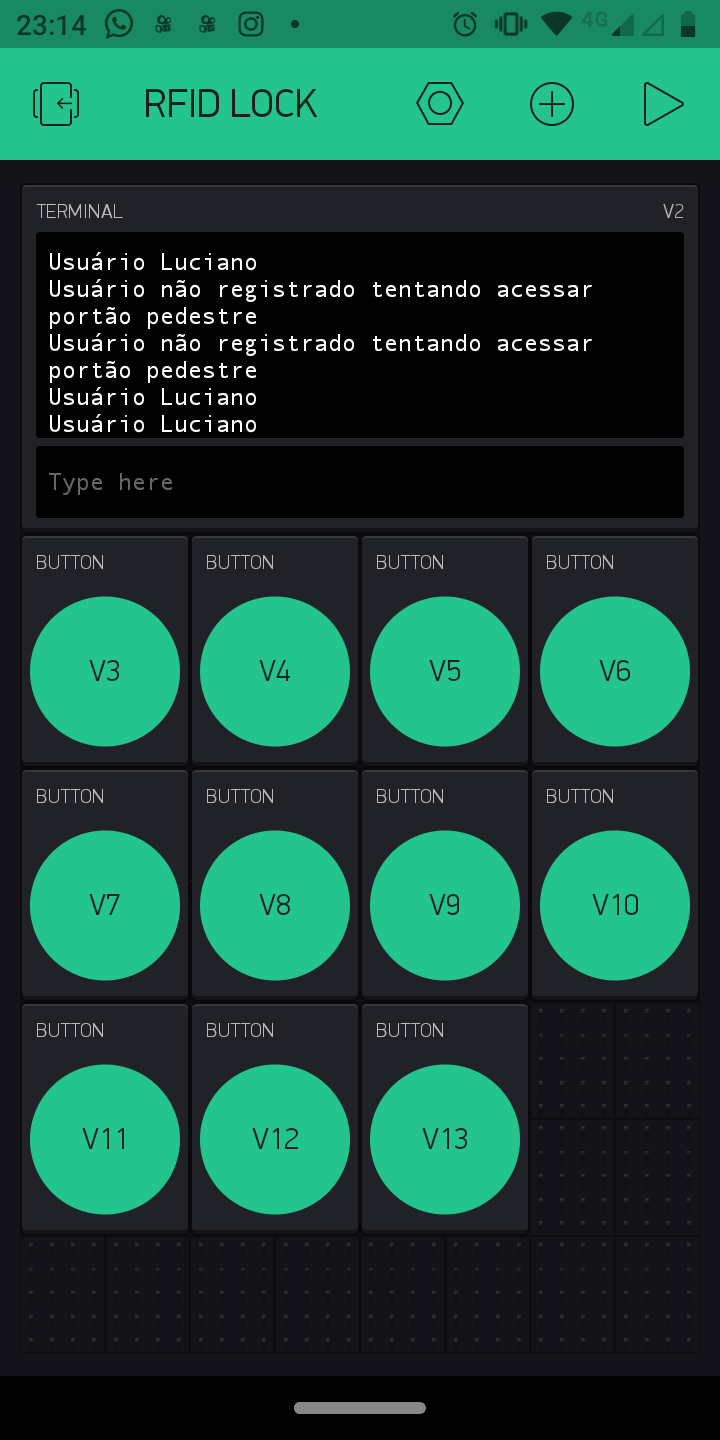
This code does not want to trigger the elock output, which can be, apparently there is nothing wrong.
I was also unable to include alexa.
/* IoT based RFID smart door lock system using NodeMCU and Blynk
*/

#include "OTABlynkCredentials.h"

#ifdef ESP8266
#include <BlynkSimpleEsp8266.h>
#elif defined(ESP32)
#include <BlynkSimpleEsp32.h>
#else
#error "Board not found"
#endif
#include <SPI.h>
#include <MFRC522.h>
#include <Servo.h>
#define BLYNK_PRINT Serial
credentials Credentials;


//Variables
char auth_token[33];
bool connected_to_internet = 0;
const int Erasing_button = 0; // D3 NodeMCU Pin


//Provide credentials for your ESP server
char* esp_ssid = "IoT";
char* esp_pass = "";

#define elock D0
#define SS_PIN 4
#define RST_PIN 5
#define LED_G 9 //define green LED pin
#define LED_R 10 //define red LED
#define BUZZER 15 //buzzer pin

MFRC522 mfrc522(SS_PIN, RST_PIN);   // Create MFRC522 instance.
Servo myServo; //define servo name

SimpleTimer timer;
int aflag = 0;
int bflag = 0;
int cflag = 0;
int dflag = 0;
int eflag = 0;
int fflag = 0;
int gflag = 0;
int hflag = 0;
int iflag = 0;
int jflag = 0;
int lflag = 0;

WidgetTerminal terminal(V2);

void setup()

{

  Serial.begin(115200);
  pinMode(Erasing_button, INPUT);


  for (uint8_t t = 4; t > 0; t--) {
    Serial.println(t);
    delay(1000);
  }

  // Press and hold the button to erase all the credentials
  if (digitalRead(Erasing_button) == LOW)
  {
    Credentials.Erase_eeprom();

  }

  String auth_string = Credentials.EEPROM_Config();
  auth_string.toCharArray(auth_token, 33);

  if (Credentials.credentials_get())
  {

    Blynk.config(auth_token);
    connected_to_internet = 1;

  }
  else
  {
    Credentials.setupAP(esp_ssid, esp_pass);
    connected_to_internet = 0;
  }
  if (connected_to_internet)
  {
  SPI.begin();      // Initiate  SPI bus
  mfrc522.PCD_Init();   // Initiate MFRC522 RFID
  myServo.attach(2); //servo pin D4
  myServo.write(0); //servo start position
  pinMode(LED_G, OUTPUT);
  pinMode(LED_R, OUTPUT);
  pinMode(BUZZER, OUTPUT);
  pinMode(elock,OUTPUT);
  digitalWrite(elock, HIGH);
  noTone(BUZZER);
  Serial.println("Place your card on the reader...");
  Serial.println();
  timer.setInterval(1000L, iot_rfid);
  }
}

void loop()
{
  Credentials.server_loops();

  if (connected_to_internet)
  {


   timer.run(); // Initiates SimpleTimer
Blynk.run();

}
}
void iot_rfid()
{
  // Look for new cards
  if ( ! mfrc522.PICC_IsNewCardPresent())
  {
    return;
  }
  // Select one of the cards
  if ( ! mfrc522.PICC_ReadCardSerial())
  {
    return;
  }
  //Show UID on serial monitor
  Serial.print("UID tag :");
  String content= "";
  byte letter;
  for (byte i = 0; i < mfrc522.uid.size; i++)
  {
     Serial.print(mfrc522.uid.uidByte[i] < 0x10 ? " 0" : " ");
     Serial.print(mfrc522.uid.uidByte[i], DEC);
     content.concat(String(mfrc522.uid.uidByte[i] < 0x10 ? " 0" : " "));
     content.concat(String(mfrc522.uid.uidByte[i], DEC));
  }
  Serial.println();
  Serial.print("Message : ");
  content.toUpperCase();


  // defining cards here
  if( (content.substring(1) == "id card") && (aflag == 1) ) //change the UID of the card/cards that you want to give access
  {
    Serial.println("Usuário Luciano");
    Blynk.virtualWrite(V2, "Usuário Luciano" );
    Serial.println();
    delay(500);
    digitalWrite(LED_G, HIGH);
    digitalWrite(elock, HIGH);
    delay(3000);
    digitalWrite(elock, LOW);
    tone(BUZZER, 500);
    delay(250);
    noTone(BUZZER);
    digitalWrite(LED_G, LOW);

}
 else
 if( (content.substring(1) == "id card") && (bflag == 1) ) //change the UID of the card/cards that you want to give access
  {
    Serial.println("Usuário Cassia");
    Blynk.virtualWrite(V2, "Usuário Cassia" );
    Serial.println();
    delay(500);
    digitalWrite(LED_G, HIGH);
    digitalWrite(elock, HIGH);
    delay(3000);
    digitalWrite(elock, LOW);
    tone(BUZZER, 500);
    delay(250);
    noTone(BUZZER);
    digitalWrite(LED_G, LOW);

}
  else
 if( (content.substring(1) == "id card") && (cflag == 1) ) //change the UID of the card/cards that you want to give access
  {
    Serial.println("Usuário Larissa");
    Blynk.virtualWrite(V2, "Usuário Larissa " );
    Serial.println();
    delay(500);
    digitalWrite(LED_G, HIGH);
    digitalWrite(elock, HIGH);
    delay(3000);
    digitalWrite(elock, LOW);
    tone(BUZZER, 500);
    delay(250);
    noTone(BUZZER);
    digitalWrite(LED_G, LOW);

}
  else
 if( (content.substring(1) == "id card") && (dflag == 1) ) //change the UID of the card/cards that you want to give access
  {
    Serial.println("Usuário Samuel");
    Blynk.virtualWrite(V2, "Usuário Samuel " );
    Serial.println();
    delay(500);
    digitalWrite(LED_G, HIGH);
    digitalWrite(elock, HIGH);
    delay(3000);
    digitalWrite(elock, LOW);
    tone(BUZZER, 500);
    delay(250);
    noTone(BUZZER);
    digitalWrite(LED_G, LOW);

}
  else
 if( (content.substring(1) == "id card") && (eflag == 1) ) //change the UID of the card/cards that you want to give access
  {
    Serial.println("Usuário Michael");
    Blynk.virtualWrite(V2, "Usuário Michael " );
    Serial.println();
    delay(500);
    digitalWrite(LED_G, HIGH);
    digitalWrite(elock, HIGH);
    delay(3000);
    digitalWrite(elock, LOW);
    tone(BUZZER, 500);
    delay(250);
    noTone(BUZZER);
    digitalWrite(LED_G, LOW);

}
  else
 if( (content.substring(1) == "id card") && (fflag == 1) ) //change the UID of the card/cards that you want to give access
  {
    Serial.println("Usuário Keith");
    Blynk.virtualWrite(V2, "Usuário Keith " );
    Serial.println();
    delay(500);
    digitalWrite(LED_G, HIGH);
    digitalWrite(elock, HIGH);
    delay(3000);
    digitalWrite(elock, LOW);
    tone(BUZZER, 500);
    delay(250);
    noTone(BUZZER);
    digitalWrite(LED_G, LOW);

}
  else
 if( (content.substring(1) == "id card") && (gflag == 1) ) //change the UID of the card/cards that you want to give access
  {
    Serial.println("Usuário Silvana");
    Blynk.virtualWrite(V2, "Usuário Silvana " );
    Serial.println();
    delay(500);
    digitalWrite(LED_G, HIGH);
    digitalWrite(elock, HIGH);
    delay(3000);
    digitalWrite(elock, LOW);
    tone(BUZZER, 500);
    delay(250);
    noTone(BUZZER);
    digitalWrite(LED_G, LOW);

}
  else
 if( (content.substring(1) == "id card") && (hflag == 1) ) //change the UID of the card/cards that you want to give access
  {
    Serial.println("Usuário Cicero");
    Blynk.virtualWrite(V2, "Usuário Cicero " );
    Serial.println();
    delay(500);
    digitalWrite(LED_G, HIGH);
    digitalWrite(elock, HIGH);
    delay(3000);
    digitalWrite(elock, LOW);
    tone(BUZZER, 500);
    delay(250);
    noTone(BUZZER);
    digitalWrite(LED_G, LOW);

}
  else
 if( (content.substring(1) == "id card") && (iflag == 1) ) //change the UID of the card/cards that you want to give access
  {
    Serial.println("Usuário Osvaldo");
    Blynk.virtualWrite(V2, "Usuário Osvaldo " );
    Serial.println();
    delay(500);
    digitalWrite(LED_G, HIGH);
    digitalWrite(elock, HIGH);
    delay(3000);
    digitalWrite(elock, LOW);
    tone(BUZZER, 500);
    delay(250);
    noTone(BUZZER);
    digitalWrite(LED_G, LOW);

}
  else
 if( (content.substring(1) == "id card") && (jflag == 1) ) //change the UID of the card/cards that you want to give access
  {
    Serial.println("Usuário Manuel");
    Blynk.virtualWrite(V2, " Usuário Manuel " );
    Serial.println();
    delay(500);
    digitalWrite(LED_G, HIGH);
    digitalWrite(elock, HIGH);
    delay(3000);
    digitalWrite(elock, LOW);
    tone(BUZZER, 500);
    delay(250);
    noTone(BUZZER);
    digitalWrite(LED_G, LOW);

}
  else
 if( (content.substring(1) == "11 88 130 162") && (lflag == 1) ) //change the UID of the card/cards that you want to give access
  {
    Serial.println("Usuário Suelen");
    Blynk.virtualWrite(V2, "Usurio´Suelen " );
    Serial.println();
    delay(500);
    digitalWrite(LED_G, HIGH);
    digitalWrite(elock, HIGH);
    delay(3000);
    digitalWrite(elock, LOW);
    tone(BUZZER, 500);
    delay(250);
    noTone(BUZZER);
    digitalWrite(LED_G, LOW);

}
 else {
    Serial.println("unregistered user");
    Blynk.virtualWrite(V2, "Usuário não registrado tentando acessar portão pedestre " );
    Serial.println(" Access denied");
    digitalWrite(LED_R, HIGH);
    tone(BUZZER, 300);
    delay(1500);
    digitalWrite(LED_R, LOW);
    noTone(BUZZER);
    digitalWrite(elock, LOW);
  }
}
// in Blynk app writes values to the Virtual Pin 3
BLYNK_WRITE(V3)
{
   aflag = param.asInt(); // assigning incoming value from pin V3 to a variable

}
BLYNK_WRITE(V4)
{
   bflag = param.asInt(); // assigning incoming value from pin V4 to a variable

}

BLYNK_WRITE(V5)
{
   cflag = param.asInt(); // assigning incoming value from pin V5 to a variable

}
BLYNK_WRITE(V6)
{
   dflag = param.asInt(); // assigning incoming value from pin V3 to a variable

}
BLYNK_WRITE(V7)
{
   eflag = param.asInt(); // assigning incoming value from pin V7 to a variable

}
BLYNK_WRITE(V8)
{
   fflag = param.asInt(); // assigning incoming value from pin V8 to a variable

}
BLYNK_WRITE(V9)
{
   gflag = param.asInt(); // assigning incoming value from pin V9 to a variable

}
BLYNK_WRITE(V10)
{
   hflag = param.asInt(); // assigning incoming value from pin V10 to a variable

}
BLYNK_WRITE(V11)
{
   iflag = param.asInt(); // assigning incoming value from pin V11 to a variable

}
BLYNK_WRITE(V12)
{
   jflag = param.asInt(); // assigning incoming value from pin V12 to a variable

}
 BLYNK_WRITE(V13)
{
   lflag = param.asInt(); // assigning incoming value from pin V13 to a variable

}

////////////////////////////////////////////////////////////////////////////////////////////////////////////////////////////////////////////////////
/*OTABlynkCredentials.cpp
*/

/*!
   file OTABlynkCredentials.h

   This code is made for entering WiFi and Blynk Credentials
   Over the Air using your web browser.


   Written by Sachin Soni for techiesms YouTube channel, with
   contributions from the open source community.

  Visit our channel for more interesting projects
  https://www.youtube.com/techiesms

*/


#include "Arduino.h"
#include "OTABlynkCredentials.h"

AsyncWebServer server(80); // Creating WebServer at port 80
WebSocketsServer webSocket = WebSocketsServer(81); // Creating WebSocket Server at port81

//
// This is the webpage which is hosted on your ESP board
// and you can access this webpage by going to this address
//
//                    192.168.4.1
//

char _webpage[] PROGMEM = R"=====(
<html>
  <head>
    <script>
var connection = new WebSocket('ws://'+location.hostname+':81/');

connection.onopen = function ()
{
connection.send('Connect ' + new Date()); };
 connection.onerror = function (error)
 {
  console.log('WebSocket Error ', error);
 };
 connection.onmessage = function (e)
  {
    console.log('Server: ', e.data);
  };

  function credentials_rec()
{

  var ssid = document.getElementById('ssid_cred').value;
  var pass = document.getElementById('pass_cred').value;
  var auth = document.getElementById('auth_token').value;
  var full_command = '#{"ssid":"'+ ssid +'", "pass":"' +pass +'","auth":"'+ auth +'"}';
  console.log(full_command);
  connection.send(full_command);
  location.replace('http://'+location.hostname+'/submit');
}


  </script

  </head>
  <body>
  <label for="ssid_cred">SSID Name:</label>
  <input type="text" id="ssid_cred"><br><br>
  <label for="pass_cred">Password:</label>
  <input type="text" id="pass_cred"><br><br>
  <lable for="auth_token">Auth Token:</label>
  <input type="text" id="auth_token"><br><br>
   <button type="button" onclick=credentials_rec();>Submit</button>

</body>

</html>


)=====";


void _webSocketEvent(uint8_t num, WStype_t type, uint8_t * payload, size_t length)
{

  switch (type) {
    case WStype_DISCONNECTED:
      Serial.printf("[%u] Disconnected!\n", num);
      break;
    case WStype_CONNECTED: {
        IPAddress ip = webSocket.remoteIP(num);
        Serial.printf("[%u] Connected from %d.%d.%d.%d url: %s\n", num, ip[0], ip[1], ip[2], ip[3], payload);

        // send message to client
        webSocket.sendTXT(num, "Connected");
      }
      break;
    case WStype_TEXT:
      Serial.printf("[%u] get Text: %s\n", num, payload);

      if (payload[0] == '#')
      {
        String message = String((char*)( payload));
        message = message.substring(1);
        Serial.println(message);

        //JSON part
        DynamicJsonDocument doc(1024);
        DeserializationError error = deserializeJson(doc, message);

        String ssid = doc["ssid"];
        String pass = doc["pass"];
        String auth = doc["auth"];
        Serial.println(ssid); Serial.println(pass);


        // Clearing EEPROM
        if (ssid.length() > 0 && pass.length() > 0) {
          Serial.println("clearing eeprom");
          for (int i = 0; i < 100; ++i) {
            EEPROM.write(i, 0);
          }


          // Storing in EEPROM
          Serial.println("writing eeprom ssid:");
          for (int i = 0; i < ssid.length(); ++i)
          {
            EEPROM.write(i, ssid[i]);
            Serial.print("Wrote: ");
            Serial.println(ssid[i]);
          }
          Serial.println("writing eeprom pass:");
          for (int i = 0; i < pass.length(); ++i)
          {
            EEPROM.write(32 + i, pass[i]);
            Serial.print("Wrote: ");
            Serial.println(pass[i]);
          }
          Serial.println("writing eeprom auth token:");
          for (int i = 0; i < auth.length(); ++i)
          {
            EEPROM.write(64 + i, auth[i]);
            Serial.print("Wrote: ");
            Serial.println(auth[i]);
          }
          EEPROM.commit();
          delay(2000);

          //Restarting ESP board
          ESP.restart();
          break;
        }
     }
  }
}


void credentials::Erase_eeprom()
{
  EEPROM.begin(512); //Initialasing EEPROM
  Serial.println("Erasing...");
  Serial.println("clearing eeprom");
    for (int i = 0; i < 100; ++i)
    {
      EEPROM.write(i, 0);
    }
   EEPROM.commit();
}


String credentials::EEPROM_Config()
{
 EEPROM.begin(512); //Initialasing EEPROM
  Serial.println();
  Serial.println();

  //---------------------------------------- Read eeprom for ssid and pass
  Serial.println("Reading EEPROM");


  for (int i = 0; i < 32; ++i)
  {
    ssid += char(EEPROM.read(i));
  }
  Serial.print("SSID: ");
  Serial.println(ssid);

  for (int i = 32; i < 64; ++i)
  {
    pass += char(EEPROM.read(i));
  }

  Serial.print("Password: ");
  Serial.println(pass);
  String auth_token = "";
  for (int i = 64; i < 100; ++i)
  {
    auth_token += char(EEPROM.read(i));
  }
  Serial.print("Auth Token: ");
  Serial.println(auth_token);
  return auth_token;
}


bool credentials::credentials_get()
{
  if (_testWifi())
  {
    Serial.println("Succesfully Connected!!!");
    return true;
  }
  else
  {
    Serial.println("Turning the HotSpot On");
    return false;
  }
}


void credentials::setupAP(char* softap_ssid, char* softap_pass)
{

  WiFi.disconnect();
  delay(100);
  WiFi.softAP(softap_ssid,softap_pass);
  Serial.println("softap");
  _launchWeb();
  Serial.println("Server Started");
   webSocket.begin();
    webSocket.onEvent(_webSocketEvent);
}


bool credentials::_testWifi()
{
  int c = 0;
  Serial.println("Waiting for Wifi to connect");
  char* my_ssid = &ssid[0];
  char* my_pass = &pass[0];

  WiFi.begin(my_ssid, my_pass);
  while ( c < 20 ) {
    if (WiFi.status() == WL_CONNECTED)
    {
      return true;
    }
    delay(500);
    Serial.print("*");
    c++;
  }
  Serial.println("");
  Serial.println("Connect timed out, opening AP");
  return false;
}


// This is the function which will be called when an invalid page is called from client
void notFound(AsyncWebServerRequest *request)
{
  request->send(404, "text/plain", "Not found");
}


void credentials::_createWebServer()
{
server.on("/", [](AsyncWebServerRequest * request) {
  request->send_P(200, "text/html", _webpage);
});

// Send a GET request to <IP>/get?message=<message>
server.on("/submit", HTTP_GET, [] (AsyncWebServerRequest * request) {
  String message;
    message = "Credentials received by ESP board!!!";
   request->send(200, "text/plain", message);
});

server.onNotFound(notFound);
server.begin();

}

void credentials::_launchWeb()
{
  Serial.println("");
  Serial.print("SoftAP IP: ");
  Serial.println(WiFi.softAPIP());
  _createWebServer();
  // Start the server

}

void credentials::server_loops()
{
     webSocket.loop();
}

////////////////////////////////////////////////////////////////////////////////////////////////////////////////////////////////////////////
/* OTABlynkCredentials.h
*/

/*!
 * file OTABlynkCredentials.h
 *
 * This code is made for entering WiFi and Blynk Credentials
 * Over the Air using your web browser.
 *
 *
 * Written by Sachin Soni for techiesms YouTube channel, with
 * contributions from the open source community.
 *
 *Visit our channel for more interesting projects
 *https://www.youtube.com/techiesms
 *
 */


#ifdef ESP8266
#include <ESP8266WiFi.h>
#elif defined(ESP32)
#include <WiFi.h>
#else
#error "Board not found"
#endif

#include "Arduino.h"

//
//
//  Install these all libraries to make the project work.
//
//
#include <ESPAsyncWebServer.h>
#include <WebSocketsServer.h>
#include <ArduinoJson.h>
#include <EEPROM.h>


class credentials {
  public:
  bool credentials_get();
  void setupAP(char* softap_ssid, char* softap_pass);
  void server_loops();
  String EEPROM_Config();
  void Erase_eeprom();
  private:
  bool _testWifi(void);
  void _launchWeb(void);
  void _createWebServer(void);
  String ssid = "";
  String pass = "";
};
You seem to be missing lots of pinMode statements in your void setup.
Pete.
You also seem to be combining random sketches with very little understanding of how any of them work. At this point, you’re not even on the topic that @PeteKnight created for you.
This is the cloned “Need help with…” topic, although it will soon be as long as the original!
Pete.
Yes. I just meant that since he’s no longer attempting to use the Amazon Echo for speech commands, the topic name is no longer relevant to his code or questions. Anyone finding their way to this thread would be understandably confused by irrelevance of the discussion contained therein.
Understood - I have to say that I hadn’t even bothered to look that closely!
Pete.