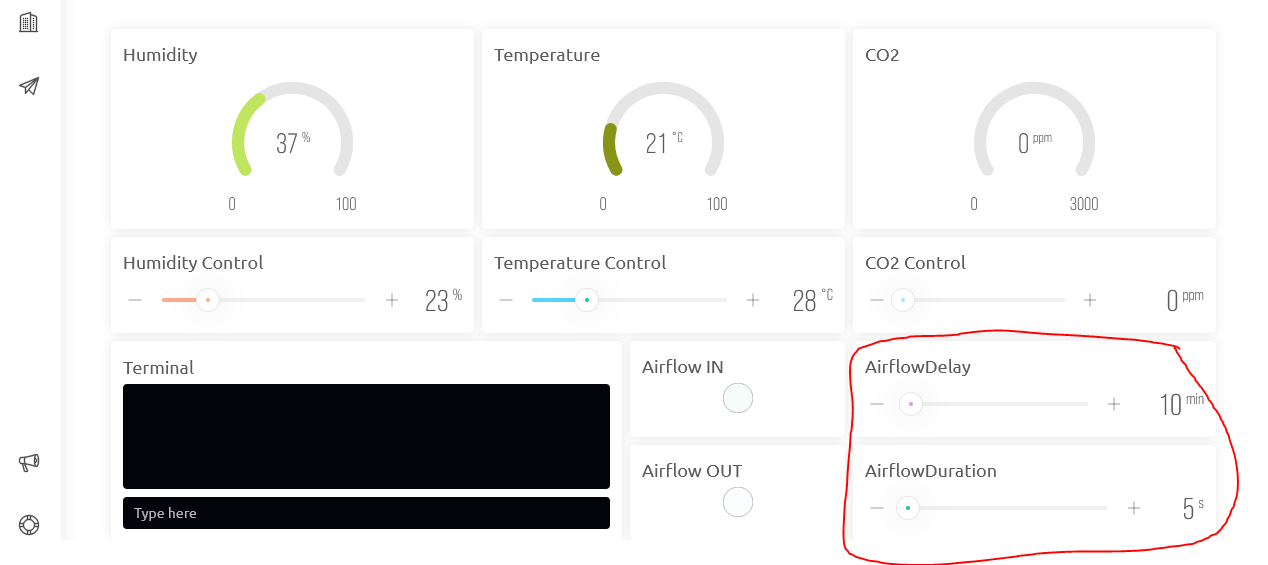
How to create a time swich function?

I’ve hacked-around your earlier code to add-in the necessary serial print statements.
In the process I’ve seen some things that are problematic and tried to fix them. I can’t do a test compilation, as I don’t have the necessary libraries installed, so there may be the odd compilation issue that needs to be fixed…

// Insert the missing parts of your sketch here...


int humidity;
int temp;
int co2;
int TVOC;
int airflowduration;
int airflowdelay;

int humiditycontrol;      // Now declared globally
int temperaturecontrol;   // Now declared globally


BLYNK_WRITE(V4)
{
  //Controls Humidity on Pin14
  
  humiditycontrol = param.asInt();
  Serial.print("BLYNK_WRITE(V4)triggered - incoming value = ");
  Serial.println(humiditycontrol);
  
  Serial.print("->BLYNK_WRITE(V4)");
  Serial.println(" ");
  Serial.println("Blynk custom settings:");
  Serial.println(" "); 
  Serial.print("        RH: ");
  Serial.print(humiditycontrol);
  Serial.print("%");

// This code moved to sensorDataRecive()
  
//  if (humiditycontrol > humidity)
//  {
//    digitalWrite(14, HIGH);
//  }
//  else
//    digitalWrite(14, LOW);
}


BLYNK_WRITE(V5)
{
  //Controls Temperature on PinX       !To enanble this funtion, assign new pin and remove //
  
  temperaturecontrol = param.asInt();
  Serial.print("BLYNK_WRITE(V5)triggered - incoming value = ");
  Serial.println(temperaturecontrol);  
  
  Serial.print("->BLYNK_WRITE(V5)"); 
  Serial.print("        Temp: ");
  Serial.print(temperaturecontrol);
  Serial.println("°C");

// Don't do this here, do it in sensorDataRecive()...
  
  //if (temperaturecontrol > temp)
  //{
  // digitalWrite(15, HIGH);
  //}
  //else
  //digitalWrite(15, LOW);
}


BLYNK_WRITE(V6)
{
  //Sets value for airflowduration from the cloud and prints it in serial monitor
  
  airflowduration = param.asInt();
  Serial.print("BLYNK_WRITE(V6)triggered - incoming value = ");
  Serial.println(airflowduration);
  airflowduration = airflowduration * 1000;
  Serial.print("airflowduration in ms = ");
  Serial.println(airflowduration); 
}


BLYNK_WRITE(V7)
{
  //Sets value for airflowdelay from the cloud and prints it in serial monitor
  
  airflowdelay = param.asInt();
  Serial.print("BLYNK_WRITE(V7)triggered - incoming value = ");
  Serial.println(airflowdelay);
  airflowdelay = airflowdelay * 1000;
  Serial.print("airflowdelay in ms = ");
  Serial.println(airflowdelay);    
}


BLYNK_WRITE(V100)
{
  //Controls TestLED on Pin12
  
  int pinValue = param.asInt();
  digitalWrite(12, pinValue);
  Serial.print("BLYNK_WRITE(V100)triggered - incoming value = ");
  Serial.println(pinValue);
}


void Airflow()  //swiches Fans on and off for a certain time
{
  digitalWrite(27, HIGH);     //swiches fan1 on
  digitalWrite(12, HIGH);     //swiches fan2 on
  Serial.println();
  airflowduration = * 1000
  Serial.print("In void Airflow - airflowduration in ms = ");
  Serial.print(airflowduration);
  Serial.println("Timer starting");

  timer.setTimeout(airflowduration, []() 
  {  
    // When the timer completes, any code here will be executed
    digitalWrite(27, LOW);     //swiches fan1 off
    digitalWrite(12, LOW);     //swiches fan2 off
    Serial.print("Timer complete - AIRFLOW OFF FOR ");
    Serial.print(airflowdelay);
    Serial.println(" ms");
    Serial.println();
  }); 
}


void setup()
{
  Serial.begin(115200);
  
  //ccs811 start
  Serial.println("CCS811 test");
  if (!ccs.begin())
  {
    Serial.println("Failed to start sensor! Please check your wiring.");
    while (1);
  }
  // Wait for the sensor to be ready
  while (!ccs.available());
  hdc1080.begin(0x40);
  //ccs811 end

  pinMode(12, OUTPUT);    //Pin 12 is an Output pin
  pinMode(14, OUTPUT);    //Pin 14 is an Output pin
  pinMode(27, OUTPUT);    //Pin 27 is an Output pin

  BlynkEdgent.begin();    //runs Blynk Connection Liberary
  
  //timer.setInterval(10 * 1000L, CCS811);             //runs void CCS811 every X*1000ms // seems to be a duplicate of what's happening in sensorDataRecive
  //delay(200);
  timer.setInterval(10 * 1000L, sensorDataRecive);   //runs void sensorDataRecive every X*1000ms
  // delay(200);
  // timer.setInterval(10 * 1000L, sensorDataSend);     //runs void sensorDataSend every X*1000ms // Not needed now
}


BLYNK_CONNECTED()
{
  Blynk.syncVirtual(V4); //HumidityControl
  Blynk.syncVirtual(V5); //AirflowDuration
  Blynk.syncVirtual(V6); //AirflowDuration
  Blynk.syncVirtual(V7); //AirflowDelay

  Serial.print("Setting timer to ");
  Serial.print(airflowdelay + airflowduration);
  Serial.println(" ms");

  // note that this timer duration won't change until the device re-starts.
  // probably need to delete the timer and re-create if different functionality is needed...
  
  timer.setInterval((airflowdelay + airflowduration), Airflow);
}


void sensorDataSend()
{
  // this code moved into sensorDataRecive
}

void CCS811() // Timer that trtiggers this is disabled
{
  Serial.println("Sensor CJMCU 8118 meassurements:");
  Serial.println(" ");
  Serial.print("        RH=");
  Serial.print(hdc1080.readHumidity());
  Serial.print("%        Temp=");
  Serial.print(hdc1080.readTemperature());
  Serial.println("°C");

  if (ccs.available()) {
    if (!ccs.readData())
    {
      Serial.print("        CO2: ");
      Serial.print(ccs.geteCO2());
      Serial.print("ppm     TVOC: ");
      Serial.println(ccs.getTVOC());
    }
    else
    {
      Serial.println("ERROR!");
      while (1);
    }
  }
}


void sensorDataRecive()
{
  // You can't do this, leave these commented-out...
  //Blynk.syncVirtual(V4); //HumidityControl
  //Blynk.syncVirtual(V5); //TemperatureControl
  //Blynk.syncVirtual(V6); //AirflowDuration
  //Blynk.syncVirtual(V7); //AirflowDelay
  //Blynk.syncVirtual(V8); //CO2 Control
  
  humidity = hdc1080.readHumidity() + 3;
  temp = hdc1080.readTemperature() - 3.6;
  co2 = ccs.geteCO2();
  TVOC = ccs.getTVOC();
  
  Blynk.virtualWrite(V0, humidity);
  Blynk.virtualWrite(V1, temp);
  Blynk.virtualWrite(V2, co2);
  Blynk.virtualWrite(V3, TVOC);

  if (humiditycontrol > humidity)
  {
    digitalWrite(14, HIGH);
  }
  else
  {
    digitalWrite(14, LOW);
  }
}


void loop()
{
  BlynkEdgent.run();
  timer.run();
}

There is an issue with the logic around the timer intervals, as once the setInterval timer is initialised it won’t be updated when your airflowduration and airflowdelay values are changed in the app, the device will need to be rebooted to re-initialise the timer with the new values.
Once the code structure and functionality is resolved then we can look at a solution for that.

When this compiles and is uploaded, if it doesn’t work as expected then post the full serial output from boot-up, with timestamp turned on.

Once again, please do not paste snippets of code and snippets of serial output, they mean nothing. If you amend the code then post the full code and the full serial output.

Pete.

@PeteKnight Thank you for helping me! I’ve just tried to run the code. Unfortunatly I get an compilation error.

/***************************************************************************
  This is a library for the CCS811 air

  This sketch reads the sensor

  Designed specifically to work with the Adafruit CCS811 breakout
  ----> http://www.adafruit.com/products/3566

  These sensors use I2C to communicate. The device's I2C address is 0x5A

  Adafruit invests time and resources providing this open source code,
  please support Adafruit andopen-source hardware by purchasing products
  from Adafruit!

  Written by Dean Miller for Adafruit Industries.
  BSD license, all text above must be included in any redistribution
 ***************************************************************************/

                                                                                                              //set Serial Monitor ro 115200 baud
// Fill-in information from your Blynk Template here
#define BLYNK_TEMPLATE_ID "TMPL6siRfUN2"
#define BLYNK_DEVICE_NAME "MushcubePrototype"
#define BLYNK_FIRMWARE_VERSION        "0.1.0"
#define BLYNK_PRINT Serial
//#define BLYNK_DEBUG
#define APP_DEBUG
// Uncomment your board, or configure a custom board in Settings.h
//#define USE_WROVER_BOARD
//#define USE_TTGO_T7
//#define USE_ESP32C3_DEV_MODULE
//#define USE_ESP32S2_DEV_KIT
#include "BlynkEdgent.h"
#include <Wire.h>
#include "Adafruit_CCS811.h"
#include "ClosedCube_HDC1080.h"

ClosedCube_HDC1080 hdc1080;
Adafruit_CCS811 ccs;
BlynkTimer timer;


int humidity;
int temp;
int co2;
int TVOC;
int airflowduration;
int airflowdelay;

int humiditycontrol;     // Now declared globally
int temperaturecontrol;  // Now declared globally


BLYNK_WRITE(V4)
{
  //Controlls Humidity on Pin14

  humiditycontrol = param.asInt();
  Serial.print("BLYNK_WRITE(V4)triggered - incoming value = ");
  Serial.println(humiditycontrol);
}


BLYNK_WRITE(V5)
 {
   //Controlls Temperature on PinX       !To enanble this funtion, assign new pin and remove //

  temperaturecontrol = param.asInt();
  Serial.print("BLYNK_WRITE(V5)triggered - incoming value = ");
  Serial.println(temperaturecontrol);

  
  // Don't do this here, do it in sensorDataRecive()...
  
  //if (temperaturecontrol > temp) 
  //{
   // digitalWrite(15, HIGH);
  //} 
  //else
    //digitalWrite(15, LOW);
}


BLYNK_WRITE(V6)
{ 
  //Sets value for airflowduration from the cloud and prints it in serial monitor

  airflowduration = param.asInt();  
  Serial.print("BLYNK_WRITE(V6)triggered - incoming value = ");
  Serial.println(airflowduration);
  airflowduration = airflowduration * 1000;
  Serial.print("airflowduration in ms = ");
  Serial.println(airflowduration); 
}


BLYNK_WRITE(V7)
{
  //Sets value for airflowdelay from the cloud and prints it in serial monitor

  airflowdelay = param.asInt();
  Serial.print("BLYNK_WRITE(V7)triggered - incoming value = ");
  Serial.println(airflowdelay);
  airflowdelay = airflowdelay * 1000;
  Serial.print("airflowdelay in ms = ");
  Serial.println(airflowdelay);
}


BLYNK_WRITE(V100)
{
  //Controlls TestLED on Pin12

  int pinValue = param.asInt();
  digitalWrite(12,pinValue);
  Serial.print("BLYNK_WRITE(V100)triggered - incoming value = ");
  Serial.println(pinValue);
}


void Airflow()    //swiches Fans on and off for a certain time
{
  digitalWrite(27, HIGH);     //swiches fan1 on
  digitalWrite(12, HIGH);     //swiches fan2 on
  Serial.println();
  airflowduration = * 1000;
  Serial.print("In void Airflow - airflowduration in ms = ");
  Serial.print(airflowduration);
  Serial.println(" Timer starting");

  timer.setTimeout(airflowduration, []()
{
  // When the timer completes, any code here will be executed
  digitalWrite(27, LOW);     //swiches fan1 off
  digitalWrite(12, LOW);     //swiches fan1 off
  Serial.print("Timer complete - AIRFLOW OFF FOR ");
  Serial.print(airflowdelay);
  Serial.println(" ms");
  Serial.println();
  });   
}
  

void setup()
{
    Serial.begin(115200);

   //ccs811 start
  Serial.println("CCS811 test");
  if(!ccs.begin())
  {
    Serial.println("Failed to start sensor! Please check your wiring.");
    while(1);
  }
  // Wait for the sensor to be ready
  while(!ccs.available());
  hdc1080.begin(0x40);
//ccs811 end

  pinMode(12, OUTPUT);    //Pin 12 is an Output pin
  pinMode(14, OUTPUT);    //Pin 14 is an Output pin
  pinMode(27, OUTPUT);    //Pin 27 is an Output pin

  BlynkEdgent.begin();    //runs Blynk Connection Liberary

  //timer.setInterval(20*1000L, SerialMonitor);               //runs void CCS811 every X*1000ms
  //delay(200);
  timer.setInterval(10*1000L, sensorDataRecive);     //runs void sensorDataRecive every X*1000ms
  //delay(200);
  //timer.setInterval(10*1000L, sensorDataSend);       //runs void sensorDataSend every X*1000ms
}


BLYNK_CONNECTED()
{
  Blynk.syncVirtual(V4); //HumidityControl
  Blynk.syncVirtual(V5); //AirflowDuration
  Blynk.syncVirtual(V6); //AirflowDuration
  Blynk.syncVirtual(V7); //AirflowDelay 
  
  Serial.print("Setting timer to ");
  Serial.print(airflowdelay + airflowduration);
  Serial.println(" ms");

  // note that this timer duration won't change until the device re-starts.
  // probably need to delete the timer and re-create if different functionality is needed...

  timer.setInterval((airflowdelay + airflowduration), Airflow);
}


void sensorDataSend()
{
 // this code moved into sensorDataRecive
}

void SerialMonitor()    // Timer that trtiggers this is disabled
{
//BLYNK_WRITE (V4)
  Serial.println(" ");
  Serial.println(" ");
  Serial.println("------------------------------------------------------");
  Serial.println("                  Additional Outputs                  ");
  Serial.println("------------------------------------------------------");  
  Serial.println(" ");
  Serial.println("        Blynk user settings:");
  Serial.println(" ");
  Serial.print("        RH: ");
  Serial.print(humiditycontrol);
  Serial.print("%");
//BLYNK_WRITE (V5)
  Serial.print("        Temp: ");
  Serial.print(temperaturecontrol);
  Serial.println("°C");
  Serial.println(" ");
//BLYNK_WRITE (V6)
  Serial.print("        Airflow - duration set by user at: ");
  Serial.print(airflowduration);
  Serial.println("sec");
//BLYNK_WRITE (V7)
  Serial.print("        Airflow - delay set by user at: ");
  Serial.print(airflowdelay);
  Serial.println("min");
  Serial.println(" ");  
//Sensor CJMCU 8118
  Serial.println("        Sensor CJMCU 8118 meassurements:");
  Serial.println(" ");
  Serial.print("        RH=");
  Serial.print(hdc1080.readHumidity());
  Serial.print("%        Temp=");
  Serial.print(hdc1080.readTemperature());
  Serial.println("°C");

  if(ccs.available()){
    if(!ccs.readData())
    {
      Serial.print("        CO2: ");
      Serial.print(ccs.geteCO2());
      Serial.print("ppm        TVOC: ");
      Serial.println(ccs.getTVOC());
    }
    else{
      Serial.println("ERROR!");
      while(1);
    }
  }
  Serial.println(" ");
  Serial.println("------------------------------------------------------");
  Serial.println(" ");
  Serial.println(" ");  
} 


void sensorDataRecive()
{   
  // You can't do this, leave these commented-out...                                         
  //Blynk.syncVirtual(V4); //HumidityControl
  //Blynk.syncVirtual(V5); //TemperatureControl
  //Blynk.syncVirtual(V6); //AirflowDuration
  //Blynk.syncVirtual(V7); //AirflowDelay
  //Blynk.syncVirtual(V8); //CO2 Control
  
  humidity=hdc1080.readHumidity()+4;
  temp=hdc1080.readTemperature()-4;
  co2=ccs.geteCO2();
  TVOC=ccs.getTVOC();

  Blynk.virtualWrite(V0, humidity);
  Blynk.virtualWrite(V1, temp);
  Blynk.virtualWrite(V2, co2);
  Blynk.virtualWrite(V3, TVOC);

  if (humiditycontrol > humidity)
  {
    digitalWrite(14, HIGH);
  }
  else
  {
    digitalWrite(14, LOW);
  }
}


void loop()
 {
  BlynkEdgent.run();
  timer.run(); 
}

Output:

E:\ Mush.os v2\ESP32 Mush.os v2.ino:133:23: error: invalid type argument of unary '*' (have 'int')

exit status 1

Compilation error: invalid type argument of unary '*' (have 'int')```


133:23 is here

  128    void Airflow()    //swiches Fans on and off for a certain time
  129 {
  130     digitalWrite(27, HIGH);     //swiches fan1 on
  131     digitalWrite(12, HIGH);     //swiches fan2 on
  132     Serial.println();
  133     airflowduration = * 1000;     //    <------- Here is the error
  134     Serial.print("In void Airflow - airflowduration in ms = ");
  135     Serial.print(airflowduration);
  136      Serial.println(" Timer starting");
  137
  138      timer.setTimeout(airflowduration, []()

Surgeon :slight_smile:

Replace line 133 for:

airflowduration = airflowduration * 1000;

Give it a try…
Regards

1 Like

Actually, Line 133 should be deleted altogether, as I’m doing the multiplication of the value here, in BLYNK_WRITE(V6)

Pete.

Line 133 got deleted.
Serial Monitor:

15:27:43.366 -> [9021] Using Dynamic IP: 192.168.0.48

15:27:43.366 -> [9021] CONNECTING_NET => CONNECTING_CLOUD

15:27:43.366 -> [9031] Connecting to blynk.cloud:443

15:27:44.334 -> [9976] Certificate OK

15:27:44.379 -> [10018] Ready (ping: 40ms).

15:27:44.544 -> BLYNK_WRITE(V4)triggered - incoming value = 35

15:27:44.575 -> BLYNK_WRITE(V5)triggered - incoming value = 28

15:27:44.662 -> BLYNK_WRITE(V6)triggered - incoming value = 12

15:27:44.662 -> airflowduration in ms = 12000

15:27:44.705 -> Setting timer to 12000 ms

15:27:44.705 -> [10359] CONNECTING_CLOUD => RUNNING

15:27:44.749 -> BLYNK_WRITE(V7)triggered - incoming value = 22

15:27:44.749 -> airflowdelay in ms = 22000

15:27:56.707 ->

15:27:56.707 -> In void Airflow - airflowduration in ms = 12000 Timer starting

15:28:08.722 ->

15:28:08.722 -> In void Airflow - airflowduration in ms = 12000 Timer starting

15:28:08.722 -> Timer complete - AIRFLOW OFF FOR 22000 ms

15:28:08.722 ->

15:28:20.718 ->

15:28:20.718 -> In void Airflow - airflowduration in ms = 12000 Timer starting

15:28:20.718 -> Timer complete - AIRFLOW OFF FOR 22000 ms

15:28:20.718 ->

15:28:32.710 ->

15:28:32.710 -> In void Airflow - airflowduration in ms = 12000 Timer starting

15:28:32.710 -> Timer complete - AIRFLOW OFF FOR 22000 ms

15:28:32.710 ->

15:28:44.729 ->

15:28:44.729 -> In void Airflow - airflowduration in ms = 12000 Timer starting

15:28:44.729 -> Timer complete - AIRFLOW OFF FOR 22000 ms

15:28:44.729 ->

15:28:56.721 ->

15:28:56.721 -> In void Airflow - airflowduration in ms = 12000 Timer starting

15:28:56.721 -> Timer complete - AIRFLOW OFF FOR 22000 ms

15:28:56.721 ->

15:29:08.685 ->

15:29:08.685 -> In void Airflow - airflowduration in ms = 12000 Timer starting

15:29:08.732 -> Timer complete - AIRFLOW OFF FOR 22000 ms

Surgeon :slight_smile:

I tried it. It does not work unfortunatly
Surgeon

You appear to have modified my code (other than adding-in the missing Blynk credentials and library #includes). Why?

Also, why is your serial output double-spaced?

Pete.

I had your and my code side to side and copied the parts of yours ypu have changed into mine. I was doing this because I try to learn and I thought that would be the best way to do so. :slight_smile:

Anyways, I made a new sketch with your code + the missing parts (1-50):

/***************************************************************************
  This is a library for the CCS811 air

  This sketch reads the sensor

  Designed specifically to work with the Adafruit CCS811 breakout
  ----> http://www.adafruit.com/products/3566

  These sensors use I2C to communicate. The device's I2C address is 0x5A

  Adafruit invests time and resources providing this open source code,
  please support Adafruit andopen-source hardware by purchasing products
  from Adafruit!

  Written by Dean Miller for Adafruit Industries.
  BSD license, all text above must be included in any redistribution
 ***************************************************************************/


                                                                                                              //set Serial Monitor ro 115200 baud


// Fill-in information from your Blynk Template here
#define BLYNK_TEMPLATE_ID "TMPL6siRfUN2"
#define BLYNK_DEVICE_NAME "MushcubePrototype"
#define BLYNK_FIRMWARE_VERSION        "0.1.0"
#define BLYNK_PRINT Serial
//#define BLYNK_DEBUG
#define APP_DEBUG
// Uncomment your board, or configure a custom board in Settings.h
//#define USE_WROVER_BOARD
//#define USE_TTGO_T7
//#define USE_ESP32C3_DEV_MODULE
//#define USE_ESP32S2_DEV_KIT
#include "BlynkEdgent.h"
#include <Wire.h>
#include "Adafruit_CCS811.h"
#include "ClosedCube_HDC1080.h"

ClosedCube_HDC1080 hdc1080;
Adafruit_CCS811 ccs;
BlynkTimer timer;

// Insert the missing parts of your sketch here...


int humidity;
int temp;
int co2;
int TVOC;
int airflowduration;
int airflowdelay;

int humiditycontrol;      // Now declared globally
int temperaturecontrol;   // Now declared globally


BLYNK_WRITE(V4)
{
  //Controls Humidity on Pin14
  
  humiditycontrol = param.asInt();
  Serial.print("BLYNK_WRITE(V4)triggered - incoming value = ");
  Serial.println(humiditycontrol);
  
  Serial.print("->BLYNK_WRITE(V4)");
  Serial.println(" ");
  Serial.println("Blynk custom settings:");
  Serial.println(" "); 
  Serial.print("        RH: ");
  Serial.print(humiditycontrol);
  Serial.print("%");

// This code moved to sensorDataRecive()
  
//  if (humiditycontrol > humidity)
//  {
//    digitalWrite(14, HIGH);
//  }
//  else
//    digitalWrite(14, LOW);
}


BLYNK_WRITE(V5)
{
  //Controls Temperature on PinX       !To enanble this funtion, assign new pin and remove //
  
  temperaturecontrol = param.asInt();
  Serial.print("BLYNK_WRITE(V5)triggered - incoming value = ");
  Serial.println(temperaturecontrol);  
  
  Serial.print("->BLYNK_WRITE(V5)"); 
  Serial.print("        Temp: ");
  Serial.print(temperaturecontrol);
  Serial.println("°C");

// Don't do this here, do it in sensorDataRecive()...
  
  //if (temperaturecontrol > temp)
  //{
  // digitalWrite(15, HIGH);
  //}
  //else
  //digitalWrite(15, LOW);
}


BLYNK_WRITE(V6)
{
  //Sets value for airflowduration from the cloud and prints it in serial monitor
  
  airflowduration = param.asInt();
  Serial.print("BLYNK_WRITE(V6)triggered - incoming value = ");
  Serial.println(airflowduration);
  airflowduration = airflowduration * 1000;
  Serial.print("airflowduration in ms = ");
  Serial.println(airflowduration); 
}


BLYNK_WRITE(V7)
{
  //Sets value for airflowdelay from the cloud and prints it in serial monitor
  
  airflowdelay = param.asInt();
  Serial.print("BLYNK_WRITE(V7)triggered - incoming value = ");
  Serial.println(airflowdelay);
  airflowdelay = airflowdelay * 1000;
  Serial.print("airflowdelay in ms = ");
  Serial.println(airflowdelay);    
}


BLYNK_WRITE(V100)
{
  //Controls TestLED on Pin12
  
  int pinValue = param.asInt();
  digitalWrite(12, pinValue);
  Serial.print("BLYNK_WRITE(V100)triggered - incoming value = ");
  Serial.println(pinValue);
}


void Airflow()  //swiches Fans on and off for a certain time
{
  digitalWrite(27, HIGH);     //swiches fan1 on
  digitalWrite(12, HIGH);     //swiches fan2 on
  Serial.println();
  Serial.print("In void Airflow - airflowduration in ms = ");
  Serial.print(airflowduration);
  Serial.println("Timer starting");

  timer.setTimeout(airflowduration, []() 
  {  
    // When the timer completes, any code here will be executed
    digitalWrite(27, LOW);     //swiches fan1 off
    digitalWrite(12, LOW);     //swiches fan2 off
    Serial.print("Timer complete - AIRFLOW OFF FOR ");
    Serial.print(airflowdelay);
    Serial.println(" ms");
    Serial.println();
  }); 
}


void setup()
{
  Serial.begin(115200);
  
  //ccs811 start
  Serial.println("CCS811 test");
  if (!ccs.begin())
  {
    Serial.println("Failed to start sensor! Please check your wiring.");
    while (1);
  }
  // Wait for the sensor to be ready
  while (!ccs.available());
  hdc1080.begin(0x40);
  //ccs811 end

  pinMode(12, OUTPUT);    //Pin 12 is an Output pin
  pinMode(14, OUTPUT);    //Pin 14 is an Output pin
  pinMode(27, OUTPUT);    //Pin 27 is an Output pin

  BlynkEdgent.begin();    //runs Blynk Connection Liberary
  
  //timer.setInterval(10 * 1000L, CCS811);             //runs void CCS811 every X*1000ms // seems to be a duplicate of what's happening in sensorDataRecive
  //delay(200);
  timer.setInterval(10 * 1000L, sensorDataRecive);   //runs void sensorDataRecive every X*1000ms
  // delay(200);
  // timer.setInterval(10 * 1000L, sensorDataSend);     //runs void sensorDataSend every X*1000ms // Not needed now
}


BLYNK_CONNECTED()
{
  Blynk.syncVirtual(V4); //HumidityControl
  Blynk.syncVirtual(V5); //AirflowDuration
  Blynk.syncVirtual(V6); //AirflowDuration
  Blynk.syncVirtual(V7); //AirflowDelay

  Serial.print("Setting timer to ");
  Serial.print(airflowdelay + airflowduration);
  Serial.println(" ms");

  // note that this timer duration won't change until the device re-starts.
  // probably need to delete the timer and re-create if different functionality is needed...
  
  timer.setInterval((airflowdelay + airflowduration), Airflow);
}


void sensorDataSend()
{
  // this code moved into sensorDataRecive
}

void CCS811() // Timer that trtiggers this is disabled
{
  Serial.println("Sensor CJMCU 8118 meassurements:");
  Serial.println(" ");
  Serial.print("        RH=");
  Serial.print(hdc1080.readHumidity());
  Serial.print("%        Temp=");
  Serial.print(hdc1080.readTemperature());
  Serial.println("°C");

  if (ccs.available()) {
    if (!ccs.readData())
    {
      Serial.print("        CO2: ");
      Serial.print(ccs.geteCO2());
      Serial.print("ppm     TVOC: ");
      Serial.println(ccs.getTVOC());
    }
    else
    {
      Serial.println("ERROR!");
      while (1);
    }
  }
}


void sensorDataRecive()
{
  // You can't do this, leave these commented-out...
  //Blynk.syncVirtual(V4); //HumidityControl
  //Blynk.syncVirtual(V5); //TemperatureControl
  //Blynk.syncVirtual(V6); //AirflowDuration
  //Blynk.syncVirtual(V7); //AirflowDelay
  //Blynk.syncVirtual(V8); //CO2 Control
  
  humidity = hdc1080.readHumidity() + 3;
  temp = hdc1080.readTemperature() - 3.6;
  co2 = ccs.geteCO2();
  TVOC = ccs.getTVOC();
  
  Blynk.virtualWrite(V0, humidity);
  Blynk.virtualWrite(V1, temp);
  Blynk.virtualWrite(V2, co2);
  Blynk.virtualWrite(V3, TVOC);

  if (humiditycontrol > humidity)
  {
    digitalWrite(14, HIGH);
  }
  else
  {
    digitalWrite(14, LOW);
  }
}


void loop()
{
  BlynkEdgent.run();
  timer.run();
}

Serial Monitor:

16:29:10.244 -> [9007] CONNECTING_NET => CONNECTING_CLOUD
16:29:10.244 -> [9017] Connecting to blynk.cloud:443
16:29:11.212 -> [9974] Certificate OK
16:29:11.248 -> [10006] Ready (ping: 30ms).
16:29:11.396 -> BLYNK_WRITE(V4)triggered - incoming value = 23
16:29:11.396 -> ->BLYNK_WRITE(V4) 
16:29:11.396 -> Blynk custom settings:
16:29:11.396 ->  
16:29:11.396 ->         RH: 23%BLYNK_WRITE(V5)triggered - incoming value = 28
16:29:11.477 -> ->BLYNK_WRITE(V5)        Temp: 28°C
16:29:11.509 -> BLYNK_WRITE(V6)triggered - incoming value = 20
16:29:11.552 -> airflowduration in ms = 20000
16:29:11.598 -> Setting timer to 20000 ms
16:29:11.598 -> [10346] CONNECTING_CLOUD => RUNNING
16:29:11.598 -> BLYNK_WRITE(V7)triggered - incoming value = 22
16:29:11.598 -> airflowdelay in ms = 22000
16:29:31.566 -> 
16:29:31.566 -> In void Airflow - airflowduration in ms = 20000Timer starting
16:29:51.551 -> 
16:29:51.551 -> In void Airflow - airflowduration in ms = 20000Timer starting
16:29:51.599 -> Timer complete - AIRFLOW OFF FOR 22000 ms
16:29:51.599 -> 
16:30:11.592 -> 
16:30:11.592 -> In void Airflow - airflowduration in ms = 20000Timer starting
16:30:11.592 -> Timer complete - AIRFLOW OFF FOR 22000 ms
16:30:11.592 -> 
16:30:31.562 -> 
16:30:31.562 -> In void Airflow - airflowduration in ms = 20000Timer starting
16:30:31.562 -> Timer complete - AIRFLOW OFF FOR 22000 ms
16:30:31.562 -> 
16:30:51.549 -> 
16:30:51.549 -> In void Airflow - airflowduration in ms = 20000Timer starting
16:30:51.591 -> Timer complete - AIRFLOW OFF FOR 22000 ms
16:30:51.591 -> 
16:31:11.586 -> 
16:31:11.586 -> In void Airflow - airflowduration in ms = 20000Timer starting
16:31:11.586 -> Timer complete - AIRFLOW OFF FOR 22000 ms

I just changed airflowdurationto 5000ms and airflowdelayto 10000ms. I kept running your script for about 30min. During that time i came across those outputs in the serial monitor.

17:03:55.881 -> Timer complete - AIRFLOW OFF FOR 10000 ms
17:03:55.924 -> Timer complete - AIRFLOW OFF FOR 10000 ms
17:03:56.168 -> Timer complete - AIRFLOW OFF FOR 10000 ms
17:03:56.288 -> Timer complete - AIRFLOW OFF FOR 10000 ms
17:03:58.764 -> Timer complete - AIRFLOW OFF FOR 10000 ms
17:03:59.293 -> In void Airflow - airflowduration in ms = 5000Timer starting
17:03:59.293 -> Timer complete - AIRFLOW OFF FOR 10000 ms
17:04:04.300 -> In void Airflow - airflowduration in ms = 5000Timer starting
17:04:04.300 -> Timer complete - AIRFLOW OFF FOR 10000 ms
17:04:05.875 -> In void Airflow - airflowduration in ms = 5000Timer starting
17:04:05.906 -> In void Airflow - airflowduration in ms = 5000Timer starting
17:04:06.175 -> In void Airflow - airflowduration in ms = 5000Timer starting
17:04:06.303 -> In void Airflow - airflowduration in ms = 5000Timer starting
17:04:08.779 -> In void Airflow - airflowduration in ms = 5000Timer starting
17:04:09.300 -> In void Airflow - airflowduration in ms = 5000Timer starting
17:04:09.300 -> Timer complete - AIRFLOW OFF FOR 10000 ms
17:04:10.868 -> Timer complete - AIRFLOW OFF FOR 10000 ms
17:04:10.944 -> Timer complete - AIRFLOW OFF FOR 10000 ms

Surgeon :slight_smile:

I have found the reason.

void Airflow()  //swiches Fans on and off for a certain time
{
  digitalWrite(27, HIGH);     //swiches fan1 on
  digitalWrite(12, HIGH);     //swiches fan2 on
  //Serial.println();                                                  <-----This was the reason
  Serial.print("In void Airflow - airflowduration in ms = ");
  Serial.print(airflowduration);
  Serial.println("Timer starting");

  timer.setTimeout(airflowduration, []() 
  {  
    // When the timer completes, any code here will be executed
    digitalWrite(27, LOW);     //swiches fan1 off
    digitalWrite(12, LOW);     //swiches fan2 off
    Serial.print("Timer complete - AIRFLOW OFF FOR ");
    Serial.print(airflowdelay);
    Serial.println(" ms");
    //Serial.println();                                             <-----This was the reason
  }); 
}

This is what the serial monitor says after starting:

17:12:33.232 -> [10072] Connecting to blynk.cloud:443
17:12:34.566 -> [11396] Certificate OK
17:12:34.612 -> [11458] Ready (ping: 60ms).
17:12:34.784 -> BLYNK_WRITE(V4)triggered - incoming value = 23
17:12:34.784 -> ->BLYNK_WRITE(V4) 
17:12:34.784 -> Blynk custom settings:
17:12:34.784 ->  
17:12:34.784 ->         RH: 23%BLYNK_WRITE(V5)triggered - incoming value = 28
17:12:34.860 -> ->BLYNK_WRITE(V5)        Temp: 28��C
17:12:34.906 -> BLYNK_WRITE(V6)triggered - incoming value = 5
17:12:34.906 -> airflowduration in ms = 5000
17:12:34.950 -> Setting timer to 5000 ms
17:12:34.950 -> [11799] CONNECTING_CLOUD => RUNNING
17:12:34.983 -> BLYNK_WRITE(V7)triggered - incoming value = 10
17:12:34.983 -> airflowdelay in ms = 10000
17:12:39.966 -> In void Airflow - airflowduration in ms = 5000Timer starting
17:12:44.962 -> In void Airflow - airflowduration in ms = 5000Timer starting
17:12:44.962 -> Timer complete - AIRFLOW OFF FOR 10000 ms
17:12:49.959 -> In void Airflow - airflowduration in ms = 5000Timer starting
17:12:49.959 -> Timer complete - AIRFLOW OFF FOR 10000 ms
17:12:54.966 -> In void Airflow - airflowduration in ms = 5000Timer starting
17:12:54.966 -> Timer complete - AIRFLOW OFF FOR 10000 ms
17:12:59.929 -> In void Airflow - airflowduration in ms = 5000Timer starting
17:12:59.974 -> Timer complete - AIRFLOW OFF FOR 10000 ms
17:13:04.968 -> In void Airflow - airflowduration in ms = 5000Timer starting
17:13:04.968 -> Timer complete - AIRFLOW OFF FOR 10000 ms
17:13:09.935 -> In void Airflow - airflowduration in ms = 5000Timer starting
17:13:09.935 -> Timer complete - AIRFLOW OFF FOR 10000 ms
17:13:14.963 -> In void Airflow - airflowduration in ms = 5000Timer starting
17:13:14.963 -> Timer complete - AIRFLOW OFF FOR 10000 ms
17:13:19.965 -> In void Airflow - airflowduration in ms = 5000Timer starting
17:13:19.965 -> Timer complete - AIRFLOW OFF FOR 10000 ms
17:13:24.934 -> In void Airflow - airflowduration in ms = 5000Timer starting
17:13:24.934 -> Timer complete - AIRFLOW OFF FOR 10000 ms
17:13:29.963 -> In void Airflow - airflowduration in ms = 5000Timer starting
17:13:29.963 -> Timer complete - AIRFLOW OFF FOR 10000 ms
17:13:34.970 -> In void Airflow - airflowduration in ms = 5000Timer starting
17:13:34.970 -> Timer complete - AIRFLOW OFF FOR 10000 ms
17:13:39.967 -> In void Airflow - airflowduration in ms = 5000Timer starting
17:13:39.967 -> Timer complete - AIRFLOW OFF FOR 10000 ms
17:13:44.961 -> In void Airflow - airflowduration in ms = 5000Timer starting
17:13:44.961 -> Timer complete - AIRFLOW OFF FOR 10000 ms
17:13:49.927 -> In void Airflow - airflowduration in ms = 5000Timer starting
17:13:49.972 -> Timer complete - AIRFLOW OFF FOR 10000 ms
17:13:54.931 -> In void Airflow - airflowduration in ms = 5000Timer starting
17:13:54.931 -> Timer complete - AIRFLOW OFF FOR 10000 ms
17:13:59.969 -> In void Airflow - airflowduration in ms = 5000Timer starting
17:13:59.969 -> Timer complete - AIRFLOW OFF FOR 10000 ms
17:14:04.937 -> In void Airflow - airflowduration in ms = 5000Timer starting
17:14:04.937 -> Timer complete - AIRFLOW OFF FOR 10000 ms
17:14:09.967 -> In void Airflow - airflowduration in ms = 5000Timer starting
17:14:09.967 -> Timer complete - AIRFLOW OFF FOR 10000 ms
17:14:14.953 -> In void Airflow - airflowduration in ms = 5000Timer starting
17:14:14.953 -> Timer complete - AIRFLOW OFF FOR 10000 ms

No, that wasn’t the reason why every line of serial output, including those generated by the Blynk debug routine were double spaced.

Pete.

Can you clarify the code changes you made to achieve this please?

Also, take care to use the correct characters when posting code. These aren’t triple backticks…

Pete.

I changed it on the blynk web dashboard. Not in the code

I edited the post :slight_smile:

I don’t understand.

Pete.

ok :confused:
i changed it back to your orignal code. What causes the double spacing?

/***************************************************************************
  This is a library for the CCS811 air

  This sketch reads the sensor

  Designed specifically to work with the Adafruit CCS811 breakout
  ----> http://www.adafruit.com/products/3566

  These sensors use I2C to communicate. The device's I2C address is 0x5A

  Adafruit invests time and resources providing this open source code,
  please support Adafruit andopen-source hardware by purchasing products
  from Adafruit!

  Written by Dean Miller for Adafruit Industries.
  BSD license, all text above must be included in any redistribution
 ***************************************************************************/


                                                                                                              //set Serial Monitor ro 115200 baud


// Fill-in information from your Blynk Template here
#define BLYNK_TEMPLATE_ID "TMPL6siRfUN2"
#define BLYNK_DEVICE_NAME "MushcubePrototype"
#define BLYNK_FIRMWARE_VERSION        "0.1.0"
#define BLYNK_PRINT Serial
//#define BLYNK_DEBUG
#define APP_DEBUG
// Uncomment your board, or configure a custom board in Settings.h
//#define USE_WROVER_BOARD
//#define USE_TTGO_T7
//#define USE_ESP32C3_DEV_MODULE
//#define USE_ESP32S2_DEV_KIT
#include "BlynkEdgent.h"
#include <Wire.h>
#include "Adafruit_CCS811.h"
#include "ClosedCube_HDC1080.h"

ClosedCube_HDC1080 hdc1080;
Adafruit_CCS811 ccs;
BlynkTimer timer;

// Insert the missing parts of your sketch here...


int humidity;
int temp;
int co2;
int TVOC;
int airflowduration;
int airflowdelay;

int humiditycontrol;      // Now declared globally
int temperaturecontrol;   // Now declared globally


BLYNK_WRITE(V4)
{
  //Controls Humidity on Pin14
  
  humiditycontrol = param.asInt();
  Serial.print("BLYNK_WRITE(V4)triggered - incoming value = ");
  Serial.println(humiditycontrol);
  
  Serial.print("->BLYNK_WRITE(V4)");
  Serial.println(" ");
  Serial.println("Blynk custom settings:");
  Serial.println(" "); 
  Serial.print("        RH: ");
  Serial.print(humiditycontrol);
  Serial.print("%");

// This code moved to sensorDataRecive()
  
//  if (humiditycontrol > humidity)
//  {
//    digitalWrite(14, HIGH);
//  }
//  else
//    digitalWrite(14, LOW);
}


BLYNK_WRITE(V5)
{
  //Controls Temperature on PinX       !To enanble this funtion, assign new pin and remove //
  
  temperaturecontrol = param.asInt();
  Serial.print("BLYNK_WRITE(V5)triggered - incoming value = ");
  Serial.println(temperaturecontrol);  
  
  Serial.print("->BLYNK_WRITE(V5)"); 
  Serial.print("        Temp: ");
  Serial.print(temperaturecontrol);
  Serial.println("°C");

// Don't do this here, do it in sensorDataRecive()...
  
  //if (temperaturecontrol > temp)
  //{
  // digitalWrite(15, HIGH);
  //}
  //else
  //digitalWrite(15, LOW);
}


BLYNK_WRITE(V6)
{
  //Sets value for airflowduration from the cloud and prints it in serial monitor
  
  airflowduration = param.asInt();
  Serial.print("BLYNK_WRITE(V6)triggered - incoming value = ");
  Serial.println(airflowduration);
  airflowduration = airflowduration * 1000;
  Serial.print("airflowduration in ms = ");
  Serial.println(airflowduration); 
}


BLYNK_WRITE(V7)
{
  //Sets value for airflowdelay from the cloud and prints it in serial monitor
  
  airflowdelay = param.asInt();
  Serial.print("BLYNK_WRITE(V7)triggered - incoming value = ");
  Serial.println(airflowdelay);
  airflowdelay = airflowdelay * 1000;
  Serial.print("airflowdelay in ms = ");
  Serial.println(airflowdelay);    
}


BLYNK_WRITE(V100)
{
  //Controls TestLED on Pin12
  
  int pinValue = param.asInt();
  digitalWrite(12, pinValue);
  Serial.print("BLYNK_WRITE(V100)triggered - incoming value = ");
  Serial.println(pinValue);
}


void Airflow()  //swiches Fans on and off for a certain time
{
  digitalWrite(27, HIGH);     //swiches fan1 on
  digitalWrite(12, HIGH);     //swiches fan2 on
  Serial.println();
  Serial.print("In void Airflow - airflowduration in ms = ");
  Serial.print(airflowduration);
  Serial.println("Timer starting");

  timer.setTimeout(airflowduration, []() 
  {  
    // When the timer completes, any code here will be executed
    digitalWrite(27, LOW);     //swiches fan1 off
    digitalWrite(12, LOW);     //swiches fan2 off
    Serial.print("Timer complete - AIRFLOW OFF FOR ");
    Serial.print(airflowdelay);
    Serial.println(" ms");
    Serial.println();
  }); 
}


void setup()
{
  Serial.begin(115200);
  
  //ccs811 start
  Serial.println("CCS811 test");
  if (!ccs.begin())
  {
    Serial.println("Failed to start sensor! Please check your wiring.");
    while (1);
  }
  // Wait for the sensor to be ready
  while (!ccs.available());
  hdc1080.begin(0x40);
  //ccs811 end

  pinMode(12, OUTPUT);    //Pin 12 is an Output pin
  pinMode(14, OUTPUT);    //Pin 14 is an Output pin
  pinMode(27, OUTPUT);    //Pin 27 is an Output pin

  BlynkEdgent.begin();    //runs Blynk Connection Liberary
  
  //timer.setInterval(10 * 1000L, CCS811);             //runs void CCS811 every X*1000ms // seems to be a duplicate of what's happening in sensorDataRecive
  //delay(200);
  timer.setInterval(10 * 1000L, sensorDataRecive);   //runs void sensorDataRecive every X*1000ms
  // delay(200);
  // timer.setInterval(10 * 1000L, sensorDataSend);     //runs void sensorDataSend every X*1000ms // Not needed now
}


BLYNK_CONNECTED()
{
  Blynk.syncVirtual(V4); //HumidityControl
  Blynk.syncVirtual(V5); //AirflowDuration
  Blynk.syncVirtual(V6); //AirflowDuration
  Blynk.syncVirtual(V7); //AirflowDelay

  Serial.print("Setting timer to ");
  Serial.print(airflowdelay + airflowduration);
  Serial.println(" ms");

  // note that this timer duration won't change until the device re-starts.
  // probably need to delete the timer and re-create if different functionality is needed...
  
  timer.setInterval((airflowdelay + airflowduration), Airflow);
}


void sensorDataSend()
{
  // this code moved into sensorDataRecive
}

void CCS811() // Timer that trtiggers this is disabled
{
  Serial.println("Sensor CJMCU 8118 meassurements:");
  Serial.println(" ");
  Serial.print("        RH=");
  Serial.print(hdc1080.readHumidity());
  Serial.print("%        Temp=");
  Serial.print(hdc1080.readTemperature());
  Serial.println("°C");

  if (ccs.available()) {
    if (!ccs.readData())
    {
      Serial.print("        CO2: ");
      Serial.print(ccs.geteCO2());
      Serial.print("ppm     TVOC: ");
      Serial.println(ccs.getTVOC());
    }
    else
    {
      Serial.println("ERROR!");
      while (1);
    }
  }
}


void sensorDataRecive()
{
  // You can't do this, leave these commented-out...
  //Blynk.syncVirtual(V4); //HumidityControl
  //Blynk.syncVirtual(V5); //TemperatureControl
  //Blynk.syncVirtual(V6); //AirflowDuration
  //Blynk.syncVirtual(V7); //AirflowDelay
  //Blynk.syncVirtual(V8); //CO2 Control
  
  humidity = hdc1080.readHumidity() + 3;
  temp = hdc1080.readTemperature() - 3.6;
  co2 = ccs.geteCO2();
  TVOC = ccs.getTVOC();
  
  Blynk.virtualWrite(V0, humidity);
  Blynk.virtualWrite(V1, temp);
  Blynk.virtualWrite(V2, co2);
  Blynk.virtualWrite(V3, TVOC);

  if (humiditycontrol > humidity)
  {
    digitalWrite(14, HIGH);
  }
  else
  {
    digitalWrite(14, LOW);
  }
}


void loop()
{
  BlynkEdgent.run();
  timer.run();
}

when I run your code, thats the serial monitor after booting:

18:02:45.925 -> [11132] Connecting to blynk.cloud:443
18:02:47.455 -> [12663] Certificate OK
18:02:47.501 -> [12705] Ready (ping: 40ms).
18:02:47.626 -> BLYNK_WRITE(V4)triggered - incoming value = 23
18:02:47.671 -> ->BLYNK_WRITE(V4) 
18:02:47.671 -> Blynk custom settings:
18:02:47.671 ->  
18:02:47.671 ->         RH: 23%BLYNK_WRITE(V5)triggered - incoming value = 28
18:02:47.717 -> ->BLYNK_WRITE(V5)        Temp: 28°C
18:02:47.796 -> BLYNK_WRITE(V6)triggered - incoming value = 5
18:02:47.796 -> airflowduration in ms = 5000
18:02:47.842 -> Setting timer to 5000 ms
18:02:47.842 -> [13045] CONNECTING_CLOUD => RUNNING
18:02:47.842 -> BLYNK_WRITE(V7)triggered - incoming value = 10
18:02:47.842 -> airflowdelay in ms = 10000
18:02:52.820 -> 
18:02:52.820 -> In void Airflow - airflowduration in ms = 5000Timer starting
18:02:57.798 -> 
18:02:57.843 -> In void Airflow - airflowduration in ms = 5000Timer starting
18:02:57.843 -> Timer complete - AIRFLOW OFF FOR 10000 ms
18:02:57.843 -> 
18:03:02.803 -> 
18:03:02.803 -> In void Airflow - airflowduration in ms = 5000Timer starting
18:03:02.803 -> Timer complete - AIRFLOW OFF FOR 10000 ms
18:03:02.850 -> 
18:03:07.823 -> 
18:03:07.823 -> In void Airflow - airflowduration in ms = 5000Timer starting
18:03:07.823 -> Timer complete - AIRFLOW OFF FOR 10000 ms
18:03:07.823 -> 
18:03:12.828 -> 
18:03:12.828 -> In void Airflow - airflowduration in ms = 5000Timer starting
18:03:12.828 -> Timer complete - AIRFLOW OFF FOR 10000 ms
18:03:12.828 -> 
18:03:17.822 -> 
18:03:17.822 -> In void Airflow - airflowduration in ms = 5000Timer starting
18:03:17.822 -> Timer complete - AIRFLOW OFF FOR 10000 ms
18:03:17.822 -> 
18:03:22.833 -> 
18:03:22.833 -> In void Airflow - airflowduration in ms = 5000Timer starting
18:03:22.833 -> Timer complete - AIRFLOW OFF FOR 10000 ms

Surgeon :slight_smile:

I changed the values for the airflowdelay and airflowduration on the web dashboard.


Surgeon :slight_smile:

So I assume that this should have read…

I just changed the widget attached to datastream V6 to 5 and V7 to to 10 via the web dashboard?

If so, what’s the significance of these numbers compared top the previous ones, and what’s the significance of the serial monitor output that you posted after this comment?

Pete.

Yes, that is what i meant. I try to be more exact next time :slight_smile:

I think there is no significance to those numbers compared to the previous ones either to the second serial monitor.

What are the next steps?
Thank you for your help Pete, I appreciate that very much! :pray:

Okay, I’ve been doing some testing with a cut-down version of the sketch, which compiles for me because I’ve removed all the libraries, code etc associated your sensors.

This approach now works for me…

#define BLYNK_TEMPLATE_ID "REDACTED"
#define BLYNK_DEVICE_NAME "REDACTED"

#define BLYNK_FIRMWARE_VERSION        "0.1.0"

#define BLYNK_PRINT Serial
//#define BLYNK_DEBUG
#define APP_DEBUG
// Uncomment your board, or configure a custom board in Settings.h
//#define USE_WROVER_BOARD
//#define USE_TTGO_T7
//#define USE_ESP32C3_DEV_MODULE
//#define USE_ESP32S2_DEV_KIT

#include "BlynkEdgent.h"

BlynkTimer timer;

int airflowduration;
int airflowdelay;

int humiditycontrol;     // Now declared globally
int temperaturecontrol;  // Now declared globally
 int timer_start_millis;  // used for reporting, must be global

BLYNK_WRITE(V6)
{ 
  //Sets value for airflowduration from the cloud and prints it in serial monitor

  airflowduration = param.asInt();  
  Serial.print("BLYNK_WRITE(V6)triggered - incoming value = ");
  Serial.println(airflowduration);
  airflowduration = airflowduration * 1000;
  Serial.print("airflowduration in ms = ");
  Serial.println(airflowduration); 
}


BLYNK_WRITE(V7)
{
  //Sets value for airflowdelay from the cloud and prints it in serial monitor

  airflowdelay = param.asInt();
  Serial.print("BLYNK_WRITE(V7)triggered - incoming value = ");
  Serial.println(airflowdelay);
  airflowdelay = airflowdelay * 1000;
  Serial.print("airflowdelay in ms = ");
  Serial.println(airflowdelay);
}


void turn_fans_on()
{
  timer_start_millis = millis(); // capture the current millis value
  
  timer.setTimeout(airflowduration, []()
  {
    // When the timer completes, any code here will be executed
    digitalWrite(27, LOW);     //swiches fan1 off
    digitalWrite(12, LOW);     //swiches fan1 off
    Serial.print("Fan run timer complete - fans were on for ");
    Serial.print(millis()-timer_start_millis);
    Serial.println(" ms");
    Serial.println();
    wait_between_fan_runs(); // call the function that waits until the next fan run is due
  });  
}


void wait_between_fan_runs()
{
  timer_start_millis = millis(); // capture the current millis value

  timer.setTimeout(airflowdelay, []()
  {
    // When the timer completes, any code here will be executed
    Serial.print("Wait timer complete - fans were off for ");
    Serial.print(millis()-timer_start_millis);
    Serial.println(" ms");
    Serial.println();
    turn_fans_on(); // call the function to turn the fans on
  });  
}


void setup()
{
  Serial.begin(115200);

  BlynkEdgent.begin();    //runs Blynk Connection Liberary

//  timer.setInterval(10*1000L, sensorDataRecive);
}


BLYNK_CONNECTED()
{
  Blynk.syncVirtual(V6); //AirflowDuration
  Blynk.syncVirtual(V7); //AirflowDelay 

  // If you want the fans to run immediately after startup then call `turn_fans_on()`
  turn_fans_on();

  // If instead you want the wait period to pass before the fans first run then call `wait_between_fan_runs()`
  //wait_between_fan_runs();
}


void loop()
 {
  BlynkEdgent.run();
  timer.run();
}

Pete.
1 Like

I’ve implementet your new code. Works wunderful!
I can’t say how much I thank you Pete!
Case closed!

1 Like

That’s good.
I think the issue was to do with passing values into Lambda functions, but a different approach was needed anyway to solve the issue that the setInterval timer is only actioned at startup.

Pete.