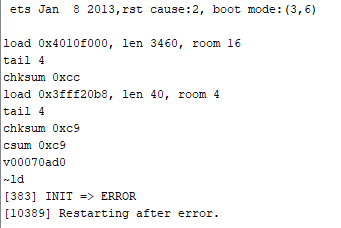
Hi, here are the details of my project first,
Hardware: NodMCU ESP12E
I am using the new blynk 2.0 to control a led bulb. When I had used only one blynk.write to check if it is working, all went good. But when i started to add more blynk.write’s, the board was not reflecting as online in the app/web-dashboard. I am unable to understand why this is happening. Could anyone please help me out1
Code:
// Fill-in information from your Blynk Template here
    #define BLYNK_TEMPLATE_ID "TMPL97m4kvuI"
    #define BLYNK_DEVICE_NAME "Smart Home 2"
    #define BLYNK_FIRMWARE_VERSION        "0.1.0"
    #define BLYNK_PRINT Serial
    //#define BLYNK_DEBUG
    #define APP_DEBUG
    // Uncomment your board, or configure a custom board in Settings.h
    //#define USE_SPARKFUN_BLYNK_BOARD
    //#define USE_NODE_MCU_BOARD
    //#define USE_WITTY_CLOUD_BOARD
    #include "BlynkEdgent.h"
    void setup()
    {
      pinMode(5, OUTPUT);
      pinMode(4, OUTPUT);
      pinMode(14, OUTPUT);// Initialise digital pin 2 as an output pin
      Serial.begin(115200);
      delay(100);
    }

    BLYNK_WRITE(V0) // Executes when the value of virtual pin 0 changes
    {
      if(param.asInt() == 1)
      {
        // execute this code if the switch widget is now ON
        digitalWrite(5,HIGH);  // Set digital pin 2 HIGH
      }

      else
      {
        // execute this code if the switch widget is now OFF
        digitalWrite(5,LOW);  // Set digital pin 2 LOW
      }
    }
    BLYNK_WRITE(V1) // Executes when the value of virtual pin 0 changes
    {
      if(param.asInt() == 1)
      {
        // execute this code if the switch widget is now ON
        digitalWrite(4,HIGH);  // Set digital pin 2 HIGH
      }

      else
      {
        // execute this code if the switch widget is now OFF
        digitalWrite(4,LOW);  // Set digital pin 2 LOW
      }
    }
    BLYNK_WRITE(V2) // Executes when the value of virtual pin 0 changes
    {
      if(param.asInt() == 1)
      {
        // execute this code if the switch widget is now ON
        digitalWrite(14,HIGH);  // Set digital pin 2 HIGH
      }

      else
      {
        // execute this code if the switch widget is now OFF
        digitalWrite(14,LOW);  // Set digital pin 2 LOW
      }
    }
    void loop() {
      BlynkEdgent.run();
    }