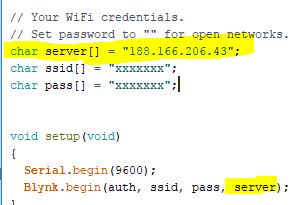
Hi There;
I was looking for it.
Just adding the yellow marked codes are solved my problem easily.
Thanks to @semihselcuk for kindly help.
Have good day mates!
Merhaba arkadaşlar;
Bildiğiniz üzere Blynk bağlantısında problem yaşıyorduk. @Dmytro nin vermiş olduğu ip adresini mobil cihazınızdan Custom IP bölümüne yazarak problemi çözüyoruz.
Ancak bununla bitmiyor.
Projenizin çalışması için arduino kodunuzu da değiştirmeniz gerekiyor!
Semih arkadaşımıza da bu konuda yardımcı olduğu için teşekkür ederiz.
Ekteki ekran görüntüsünde Sarı Marker ile işaretlenmiş olan kodları Arduino projenize eklemeniz yeterli.
Hepinize güzel günler arkadaşlar.
Hello friends;
As you know, we were having problems with the Blynk connection. We solve the problem by typing the ip address that @Dmytro has given in the Custom IP section of your mobile device.
But that does not stop there.
You need to change your arduino code for your project to work!
Thank you Semih friend for helping us.
In the next screen you can add the codes marked with Yellow Marker to the Arduino proj.
Have a nice day, friends.